The original on one side, your translation on the other.
Goethe Write is a Mac app for long texts. Translators keep the source beside their own text, scroll both together, track names and terms and deliver exactly the file the publisher asks for. It is not a CAT tool, and this page says where the difference lies.


Two texts, one train of thought.
A translation lives between two texts. You read a paragraph of the original, write it anew, look up how you rendered a name forty pages ago and check that a term means the same everywhere. Then come the publisher’s editor, the copy-editor and a delivery format that never matches the last one.
Goethe Write keeps the original in view, the terms in one place and every round of edits on record.
The source beside your text.
- The Second PaneView ▸ Show Second Pane (⌥⌘↩) puts a second text, a PDF or an image beside the one you write – or below it, if you prefer.
- Scroll in SyncTwo texts side by side run together, proportionally: a third through the original, a third through the translation.
- The original as a PDFAdd it with File ▸ Add Files to Research…. Search it, highlight passages in five colors, and let text recognition make scanned pages searchable.
- The original as textFile ▸ Import ▸ Texts (Word, RTF, Markdown)… brings it in. Take it out of the export with Entry ▸ In Export, and it stays in the project but never in the delivery.
- A second displayOpen in New Window opens a text in its own window that you can drag to another screen.
Names and terms that stay the same.
Defined terms
In Terms and Values (switch it on under Project ▸ Tools…) you note a term with its definition. The tool counts the places it occurs and flags them when the definition changes.
Search the whole project
Search Project (⇧⌘F) finds a word in every text, comment and research PDF, with regular expressions if you need them.
Replace with a safety net
Rename a character in every chapter with “Replace All”. Each affected text is saved as a snapshot first.
Who is who
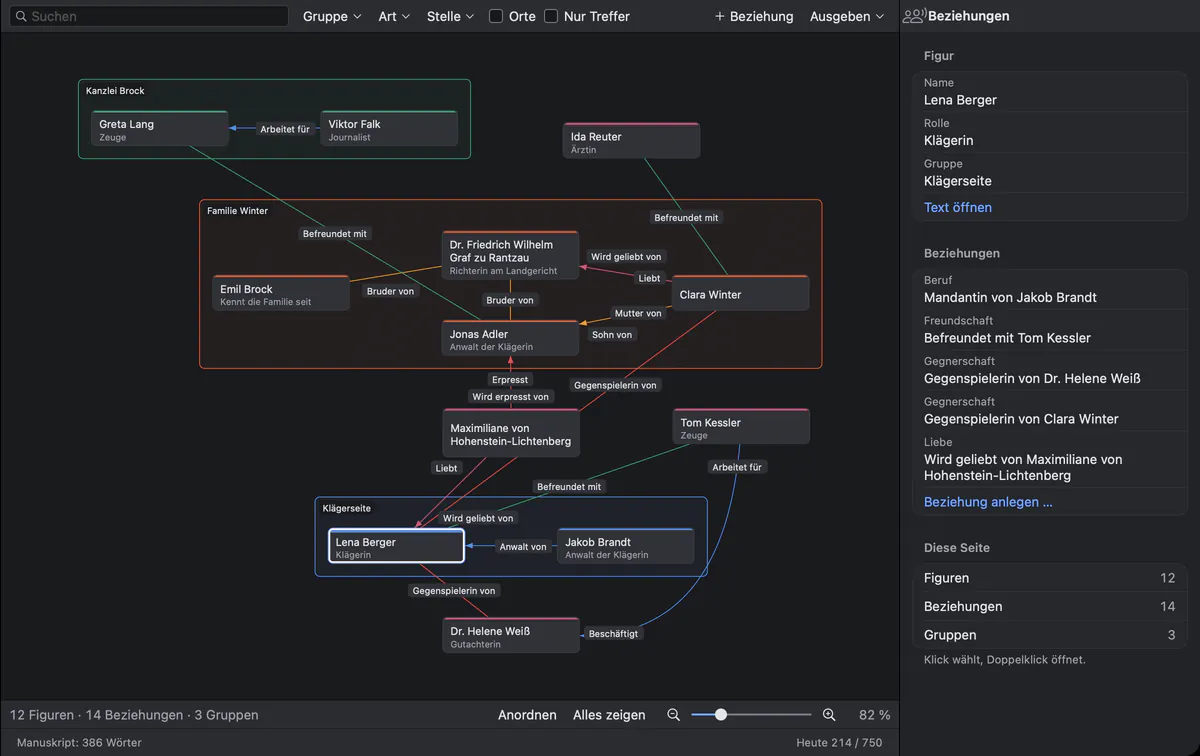
For a novel, the relationship map draws the characters and how they are connected, labeled in your own words.
Keep the cast of a novel in view.
In a long novel the relationship map shows at a glance who is whose brother, employer or lawyer – useful when the original uses three forms of one name. It belongs to the Fiction tools under Project ▸ Tools….
Delivered the way the publisher asks.
File ▸ Export… (⌥⇧⌘E) writes PDF, Word, EPUB, Markdown and RTF from the same text. Save a delivery once with Save as Custom Format…, for example “Word, Charter 11 pt, 1.5-spaced, page numbers bottom right”, and pick it with one click from then on.
- Word (.docx)
- Headings, real footnotes, page numbers; comments and tracked changes if you want
- Standard Manuscript
- The manuscript format for agencies and publishers, following the language of your project
- For reading and sending, with a clickable table of contents
- EPUB
- An e-book with table of contents and pop-up footnotes
The editor works in Word. You don’t have to.
Review ▸ Send as Word… exports a .docx with your comments and changes. When the editor sends it back, Review ▸ Apply Edits… shows a summary first, saves a snapshot of every text and brings in the edits as tracked changes in the editor’s name. You accept or reject each one.
Nothing is overwritten, and your own draft stays retrievable through snapshots, the versions of macOS and automatic backups every 30 minutes.
Goethe, the assistant – if you want it. AI
With Goethe Cloud and your own key from an AI provider, the assistant Goethe offers a job Translate for a passage of text or a passage in a PDF. The result comes as a copy or replaces the passage; what goes into the text arrives as a tracked change. It is a draft for you to judge, not a translation memory.
Goethe sends nothing until you allow it for that provider. With Entry ▸ Hide from Goethe, texts under a confidentiality agreement never leave your Mac.
What Goethe Write is not.
Goethe Write is not a CAT tool. It does not split texts into segments, keeps no translation memory, imports no term bases and reads no XLIFF, TMX or TBX files. For agency work that requires these formats, keep your CAT tool. For books, essays and texts you translate as prose, Goethe Write gives you a calm place to write.
Questions from translators.
Can I see the original and my translation side by side?
Yes. Open the Second Pane with ⌥⌘↩ and choose the original there, as a text or a PDF. Switch on Scroll in Sync, and both run together.
Which language does the spelling check use?
You set the language of the text per project, and the Mac checks that language. Set the project to your target language.
Does Goethe Write have a translation memory?
No. There are no segments, no translation memory and no term base import. Terms and Values keeps defined terms within one project.
Can my editor work in Word?
Yes. Send as Word gives the editor a .docx; Apply Edits brings the changes back as tracked changes and the comments as comments.
Is my client’s text sent anywhere?
Not when you write alone: projects are files on your Mac. Text goes to an AI provider only if you use Goethe and allow it, and hidden texts never go.
Your next translation starts here.
US$79.99 once for the Mac, with 14 days free. Goethe Cloud: US$4.99 a month or US$49.99 a year.