Collaborative writing for screenplays and books – end to end encrypted, guests write for free
Goethe Link connects Macs, iPhones and iPads to the same project – in the same room without the internet, or across the world through Goethe Cloud. Nobody overwrites anybody, and nobody in between can read along.


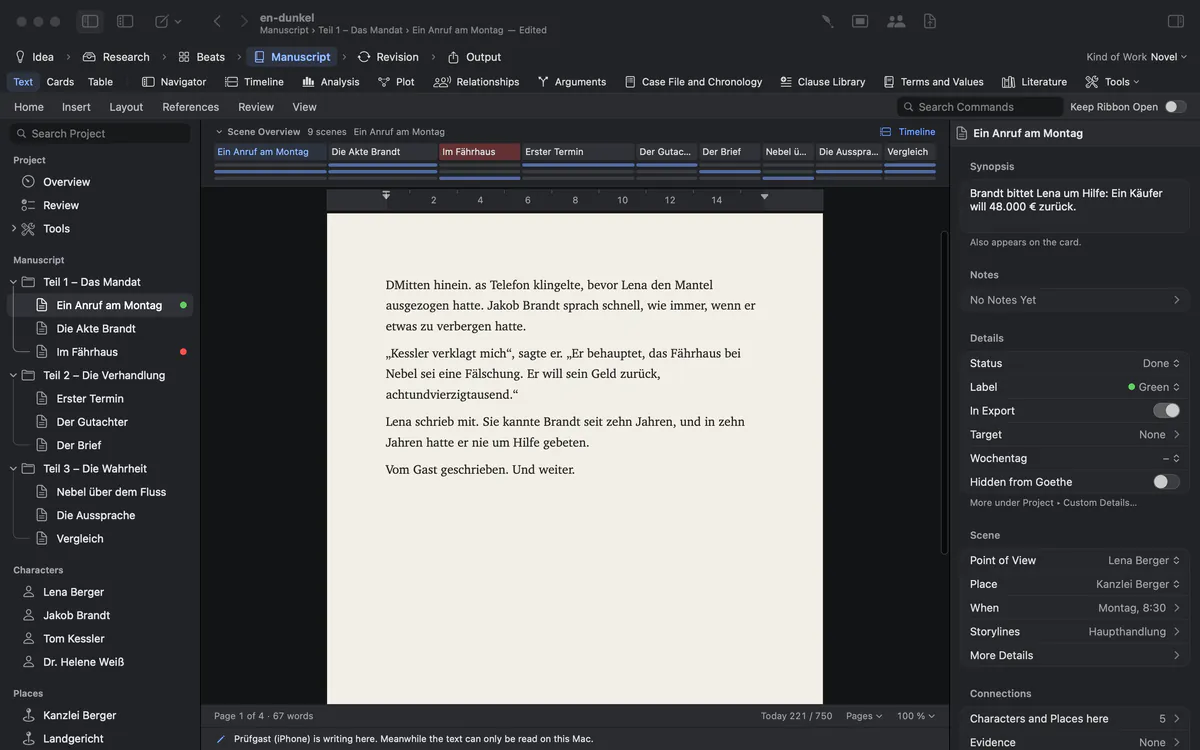
Sending files back and forth is not working together
draft_v7_final_JM_edits_FINAL2.docx. Two people changed the same scene, and one of them lost an afternoon.
Most writers still collaborate by mail: one person writes, everybody else waits, and the versions multiply. Cloud documents solve the waiting, but put an unpublished manuscript on someone else’s server – and they are made for memos, not for 400 pages or a screenplay in production format.
How Goethe Write solves it
- Save the project and click Collaborators in the toolbar.
- Turn on Share on the same network – or Share over the Internet for people elsewhere.
- In the same network: click Pair Device…. The other device chooses your Mac under File ▸ Open Project from Network…. Both show six digits; if they match, press They match. Nobody is in between.
- Over the internet: click Invite to Read or Invite to Write. Goethe Write makes a link that works once, for seven days, and that you can withdraw.
- A new device starts by reading. You decide, device by device and project by project, who may write.
The host is the Mac that has the project open; it holds the files and decides. The others – Macs, iPhones and iPads – are guests. They mirror the project and write back over the connection.
Nobody overwrites anybody
Two people type in the same paragraph at the same time. Somebody’s words disappear.
In a manuscript, one person writes in a text at a time; the others read along live. Whoever starts to write borrows the text from the host until they give it back. Before a new person writes in a text, Goethe Write takes a snapshot of it.
In a screenplay the lending goes further: several people write in the same scene at once, each in their own paragraphs. A coloured bar with the person’s name stands beside each borrowed paragraph – on the desk beside the page, never over the text. One writes the action, the other the dialogue, and nothing is overwritten.
Every text a guest sends is answered – accepted or refused with a reason. What stays unanswered waits in an outbox on the guest’s device and goes out after reconnecting. It never overwrites a version someone else changed in the meantime: the guest keeps their text and can copy it.
A writers’ room on your screens
In the meeting everybody is on a different page, and someone reads from last week’s draft.
End-to-end encrypted, by an open method
An unpublished manuscript is valuable. The café Wi-Fi is not your friend.
Everything between the devices is end-to-end encrypted – names and texts included. The devices exchange keys with an openly described procedure (X25519, HKDF-SHA256 and ChaCha20-Poly1305). On the network a Mac is found under a neutral name such as “Goethe-7F3A” that changes with every start; the names of people and computers never travel in the clear. Over the internet the Goethe Cloud relay passes on messages it cannot read.
Pairing is open only for two minutes after Pair Device…. After three unconfirmed comparisons, pairing pauses for ten minutes – a guard against someone trying keys in between. When you start sharing, Goethe Write quietly makes a backup of the project first.
Fair by design: guests pay nothing
Your editor shouldn’t need a subscription to read your book.
Sharing – being the host – belongs to Goethe Cloud. Being a guest is free: whoever is invited needs no subscription and no account, on a Mac, an iPhone or an iPad. Whoever invites pays. In a project you were invited to, your role decides whether you write.
For readers without Goethe Write – a producer, an agent, a publisher – there is the read link: the work in any browser, with comments that come back into your project.
What is planned
Today a shared project lives on the host’s Mac, and the guests connect to it while it is open. Planned: writing in the browser (readers only read and comment there today), working at different times while the host’s Mac is off, through Goethe Cloud, and undo per entry on a guest.
Rights per device and project
Your editor should read the whole novel, but write only in chapter 7, and only this afternoon.
Rights belong to a device and a project. A newly paired device reads. A known device that asks for a new project shows up under Wants to Open This Project with Allow to Read, To Write and Reject. Under Linked now, each person has a small menu: May Write on or off, Follow, Role, Sides as PDF, Disconnect and Unpair. A device can also take a text along to write on the way without a connection; meanwhile it is read-only on the host, and Restore gives it back.
Questions about working together
Do the people I invite need to pay?
No. Whoever invites needs Goethe Cloud. Guests work in that project for free, on a Mac, an iPhone or an iPad.
Can two people write in the same scene of a screenplay?
Yes. In a screenplay each person borrows paragraphs, so several people can write in the same scene at once without overwriting each other.
Does it work without the internet?
Yes. In the same network two Macs connect directly, with no internet at all. Over the internet the Goethe Cloud relay passes on encrypted messages.
Can Goethe Cloud read my shared project?
No. Everything between the devices is end-to-end encrypted. The relay passes on data it cannot read.
Can I take back writing rights during a session?
Yes. In the person’s menu under Linked now, switch May Write off. Disconnect ends the connection, Unpair forgets the device.
In the handbook
- Collaboration with Goethe LinkWork together with Goethe Link: share a project, pair devices, join as a guest, write at the same time, share a screenplay by roles and send read links.
- Reviewing: comments, changes, ReviewReview a manuscript: comments, track changes, accept and reject, revision rounds, snapshots, compare and approve, and the exchange with an editor through Word.
Bring your writers’ room together.
Sharing comes with Goethe Cloud; the first month is free for new subscribers. Guests work for free.
See pricingRead the collaboration chapterTry it free for 14 days on your Mac