Screenwriting software for Mac with Final Draft-compatible FDX files
Goethe Write sets your script in industry format while you write, breaks pages the way productions expect, and opens and saves Final Draft and Fountain files without touching what you did not change.


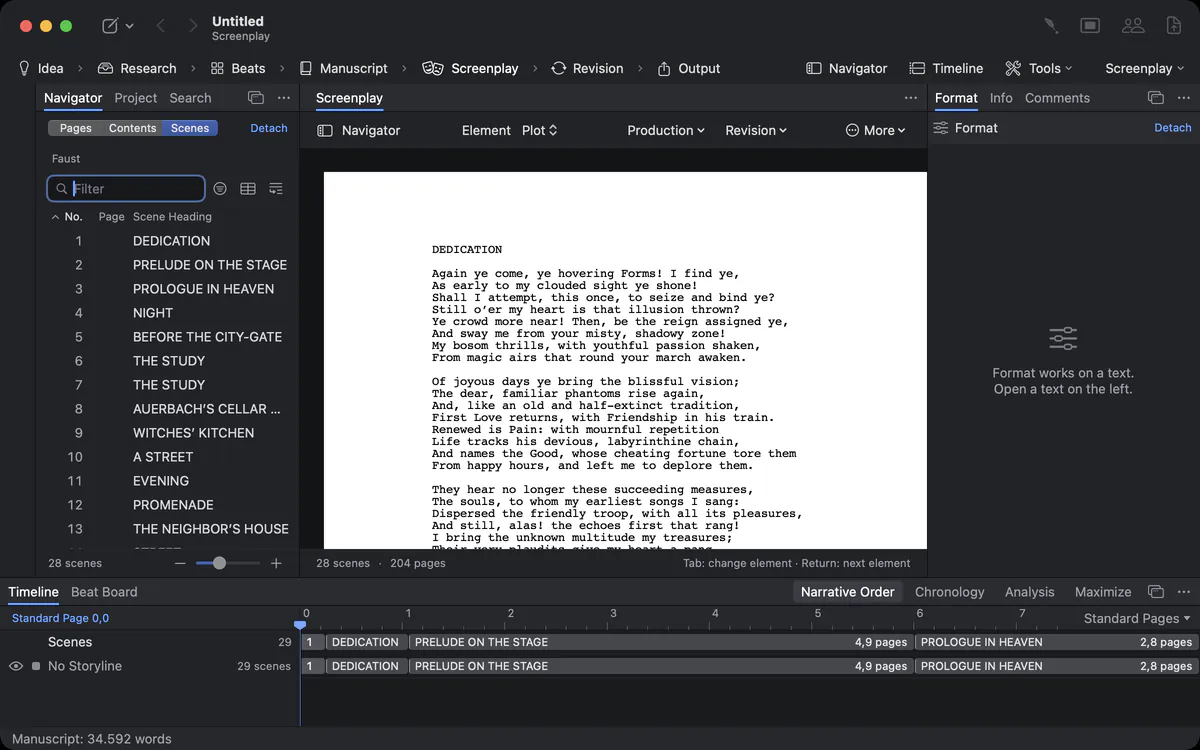
Formatting that never gets in the way
You are in the middle of a scene and the dialogue finally flows – and then you stop to fix an indent, retype a character name or hunt for the right margin.
Screenplay format is strict for good reasons: a page stands for about a minute of screen time, and everybody in a production reads the same layout. But a writer who has to think about margins while writing loses the scene. In a general word processor you either fight the styles or you accept a script that looks almost right, which is the same as wrong.
How Goethe Write solves it
- Choose File ▸ New Project… and pick a screenplay, or add a screenplay to a novel project through the Screenplay phase in the head of the window.
- Write. Return gives you the next element that makes sense: after a scene heading comes action, after a character comes dialogue.
- Tab and Shift-Tab change the element of the current paragraph: scene heading, action, character, parenthetical, dialogue, transition, shot.
- SmartType suggests what is already in your script: character names, locations, times of day and transitions. The suggestion waits in grey at the end of the line; Tab or Return takes it, typing on ignores it.
The Screenplay tab of the ribbon holds the elements, dual dialogue, scene numbers and the title page, always in the same place.
Nothing pops up while you type and nothing moves under your hands. If you prefer to write freely, write: Goethe Write recognises scene headings that begin with INT. or EXT. and character cues in capitals.
Pages you can count on
The producer asks how long the script is. Your app says 104 pages, the production’s copy says 109 – and the schedule was built on the wrong number.
Goethe Write breaks screenplay pages the way Final Draft does, on US Letter and on A4. A speech that runs over a page break gets (MORE) at the bottom and the name with (CONT’D) at the top of the next page; a scene heading never stands alone at the bottom of a page. What you see on screen is what the screenplay PDF prints.
Scene numbers follow the production’s rules. Number the scenes once, keep the numbers when you revise, and new scenes take numbers such as 2A in between, so that nobody’s schedule breaks.
Revisions the way productions work
The director wants “blue pages” by tomorrow. Nobody on set should have to search for what changed.
In production a script changes in rounds. Each round has its colour, its mark in the margin and its date. Goethe Write knows these rounds, and so does Final Draft – they travel in the FDX file.
How Goethe Write solves it
- In the head of the screenplay, choose Revision ▸ Revision Mode.
- Under Active Revision Set, choose the round, for example Blue Rev.
- Write. Every line you change carries the round’s mark in the right margin, an asterisk unless you choose another.
- With Show Page Colour, each page takes the colour of its latest round, and the header names it.
- Revision ▸ Edit Revision Sets… lets you rename the sets, give them today’s date, choose the mark and add new ones.
A new screenplay starts with the colours productions use: Blue, Pink, Yellow, Green, Goldenrod, Buff, Salmon, Cherry and Tan, and a second row after that.
Locked pages and A pages (12A) for a locked production draft are planned and not yet built. Revisions work today as described.
Final Draft and Fountain files, both ways
Your co-writer works in Final Draft, the production office wants an FDX, and you would rather not lose a single setting on the way back and forth.
Goethe Write opens .fdx files from Final Draft and .fountain files, and it saves both. It reads an FDX so that it can write it back as it was: a file you open and export again without a change is the same file, byte for byte. Only the paragraphs you changed are written anew; settings Goethe Write does not know are passed through untouched. Scene headings, characters and dialogue are recognised on your Mac – nothing goes onto the network.
Fountain is plain text with a few simple rules. It opens in any text editor, survives e-mail and works well with version control. Highland 2 and Fade In files are written too, and a PDF of the screenplay is set with the same pages you see.
Reports for the production
The line producer needs a scene list with lengths, the casting director a list of speaking roles – and you would rather write than count.
The Export menu of the screenplay writes four reports as files: a Scene Report as text, the Scene List as CSV for Excel or Numbers, and the Cast as text and CSV, with every speaking role, every silent role from the character list, the scenes they appear in, their number of speeches and their words. The scene list for production also exists as an Excel workbook.
For a table read, Roles and Sides in a shared project gives each actor the scenes of their role as a PDF (see working together).
A novel and its screenplay in one project
You adapt your own book, and the characters, places and research exist twice – once for the novel, once for the script – and they drift apart.
The screenplay can live next to the manuscript in the same project, with the same characters, places and research. The Screenplay phase appears in the head of the window as soon as a project holds a screenplay, and every draft keeps its own pages, scenes and revisions. Or keep a screenplay on its own, as a project or as a single Final Draft file.
Questions about screenplays
Does Goethe Write replace Final Draft?
For writing it does: industry format, page breaks, scene numbers, revisions, title page and reports. Because it reads and writes FDX without touching unchanged paragraphs, you can also work alongside people who stay with Final Draft.
Can I write a screenplay on the iPhone or iPad?
Yes. The free iPhone and iPad app writes screenplays with an elements bar above the keyboard and SmartType, and opens and saves .fdx and .fountain files. Revisions are not yet available there.
Which paper sizes does it support?
US Letter and A4, each with the margins productions expect. The PDF of the screenplay uses the same pages you see on screen.
What happens to FDX settings Goethe Write does not know?
They stay in the file. Blocks the program does not understand are passed through as their original bytes when you export again.
In the handbook
- Writing a screenplayWrite a screenplay in industry format: elements and SmartType, pages, scene numbers and title page, drafts and revisions, Final Draft (FDX) and Fountain files.
- Output and exportExport a work as PDF, Word, EPUB, Markdown or RTF, a screenplay as Final Draft, Fountain or PDF; choose the look, scope and contents, and import Word files.
Write the next draft in Goethe Write.
Try it free for 14 days on your Mac, or read how the screenplay works in the handbook.
Try it free for 14 days on your MacRead the screenplay chapterSee pricing