An AI writing assistant with your own API key – Goethe changes nothing without you
 AI · your own key
Goethe is the writing assistant built into Goethe Write. It works with your own key at the provider you choose, reads only what you show it, and every suggestion arrives as a change you accept or reject.



Help you can trust with a manuscript
You would like a second pair of eyes on a chapter – but not an app that rewrites your voice, sends your book to a server you don’t know and quietly changes a date in paragraph four.
Most AI writing tools are built the other way round: the AI writes, you clean up. Goethe is built for professional writers who stay the author. It suggests; you decide. Its name appears on every change it proposes, so you always see what came from it.
What Goethe does
You know the chapter is a third too long. You know a scene contradicts chapter 2. You don’t have a day to find out where.
Select a passage, right-click and choose Goethe…. A small window opens beside your text – it floats, moves with the window and covers nothing. At the top is the free field What Should Goethe Do?; below it the jobs that fit what you selected, in four groups:
The four groups of jobs
- Revise – Improve, Shorten (by about a third), Expand, Rephrase (factual, literary, legal, simpler), Correct, and Show, Don’t Tell for narrative texts.
- Check – Check Scene or Check Text looks for what doesn’t fit the characters, places, timeline and earlier scenes; Editorial Comments reads like an editor; Find Contradictions works across folders or the whole project.
- Create – Continue Writing in your voice, Write Synopsis, Suggest Titles, Sketch Next Scene; for books also Blurb and Proposal.
- Questions – Explain, Summarize, or anything you type: “Why does Lena hesitate here?”
Goethe works wherever your material is: on a character (Contradictions About, Complete Details with evidence, Summarize Appearances), a research file (Key Points as Note, Quotes on a Topic, Summarize with Pages for PDFs), a comment (Implement, Suggest Reply) or a legal text (Check Opinion Style, Suggest Evidence). The Goethe Reads menu decides how far it reads: the selection, the paragraph, the text, the folder or the whole project; Include Sources adds research files.
Nothing changes without you
An assistant that “improves” a sentence and silently turns 48,000 € into 45,000 € is a liability.
Replace puts the suggestion into your text as a change by Goethe, word by word: a correction shows as one changed word, not as a new paragraph. You accept or reject it like any tracked change, and ⌘Z takes the whole result back at once. Before accepting, Goethe Write saves a snapshot of every affected text.
Before anything is applied, Goethe Write itself – without any model – compares numbers and amounts, dates, sections of statutes, file numbers, quotations, the names of your characters and places, footnotes, negations (“not”, “no”) and limiting words (“only”, “at least”). What differs stands above the buttons – Changed: 48,000 € → 45,000 € – and the button reads Replace Anyway.
Goethe is instructed not to invent plot events, facts, names, dates, amounts, quotations or citations that are not in your material, and to mark a guess as [Guess: …]. It does not follow instructions it finds inside your material. And it can still be wrong: responsibility for the text stays with you.
Why your own key
You don’t want a writing app to decide which AI reads your book, what it costs, and where your text goes.
Goethe Write has no AI server of its own. You bring a key from a provider, and Goethe talks to that provider directly:
- You choose the model. Use the model you trust, change it whenever you like, or use a small fast model for corrections and a stronger one for an editorial pass.
- You pay the provider directly. There is no markup and no credit system in between. Goethe Write charges nothing for the answers.
- Your text goes one way. From your Mac to the provider you chose – no detour, no cookies, no cache, no redirects. Goethe Write sees neither your key nor your texts.
- You can stay entirely local. With your own server on the Mac (Ollama, LM Studio, vLLM), no text leaves the Mac at all.
Create a key and set up Goethe, step by step
The pages and menus of the providers change from time to time; the steps below describe the usual way. In Goethe Write, the button Create Key at … opens the right page for the provider you choose.
At the provider
- Anthropic – sign in to the Claude developer console, add billing or prepaid credit, open API Keys and create a key. It begins with
sk-ant-. - OpenAI – sign in to the OpenAI platform, add billing, open API keys and create a secret key. It begins with
sk-. - Google – open Google AI Studio and choose Get API key. For confidential texts, use a paid account: in the free tier Google may use inputs to improve its services.
- Mistral – sign in to the Mistral console, choose a plan with billing, open API Keys and create a key.
- OpenRouter – sign in, add credit, open Keys and create a key (it begins with
sk-or-). One key reaches many models; the provider of the chosen model also applies its terms.
Copy the key – most providers show it only once.
In Goethe Write
- Choose Goethe Write ▸ Settings… and open the page Goethe.
- Under Provider, click the provider.
- Paste the key into API Key and click Save. Only the last four characters stay visible.
- Click Check. “Valid · 5 models” means it worked; a rejected key or missing credit is named in plain words.
- Choose the Model – the recommended ones come first – and the Thoroughness: Fast, Balanced or Thorough.
- Turn on Use Goethe at the top.
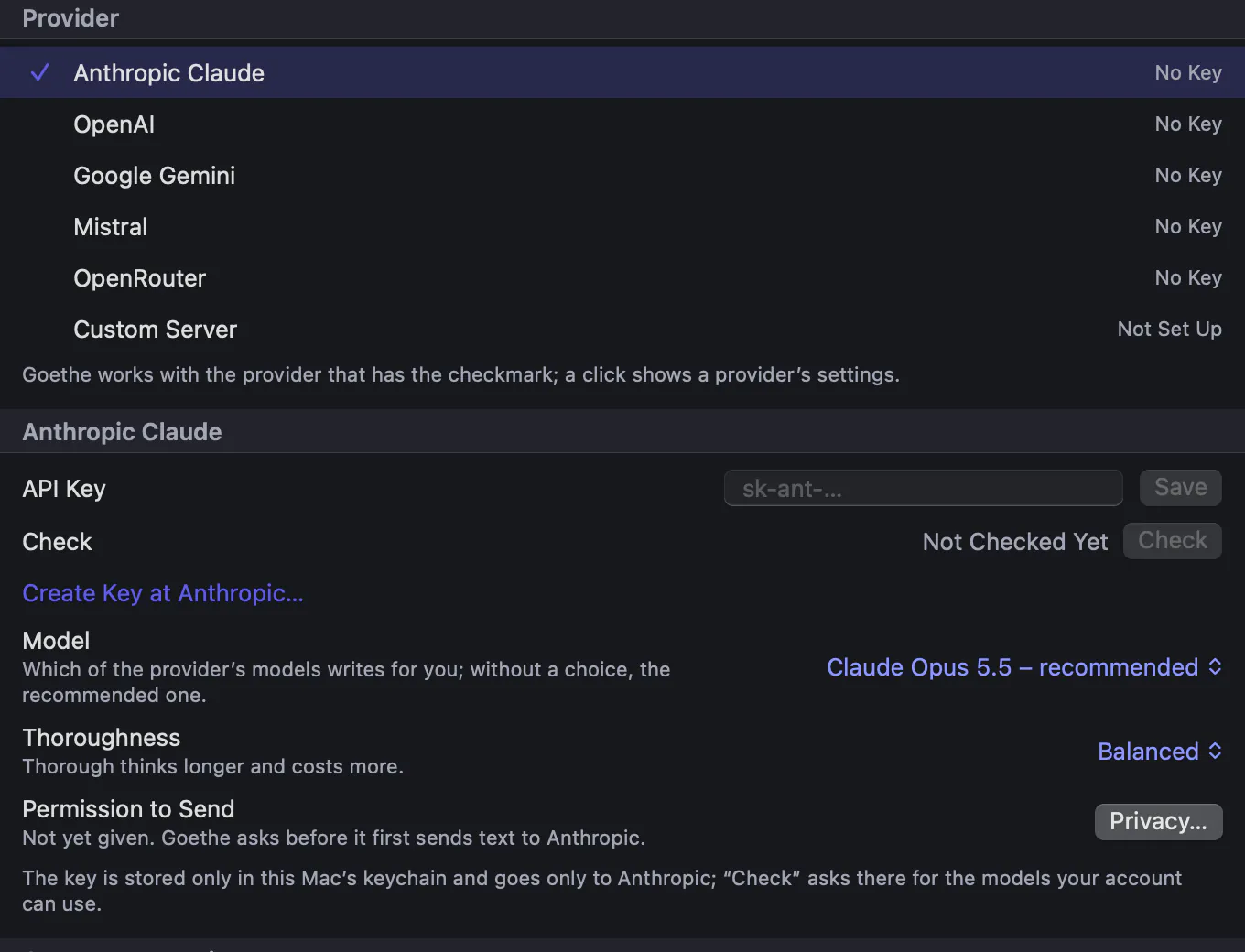
The first time you ask Goethe for something, it asks for permission, once per provider: Goethe Sends Text to …, with exactly what will be sent and a link to the provider’s privacy terms. Allow or Don’t Allow. You can withdraw it any time under Settings ▸ Goethe ▸ Privacy.
Keep the cost in view
You want to use the assistant without worrying about a surprise bill.
What a request costs depends on the provider, the model and the length of the text: providers bill by tokens, the pieces of text the model reads and writes. A short correction of a paragraph is a small request; an editorial pass over a whole folder is a large one. Check your provider’s current price list before you start.
- Set a limit at the provider. Most providers let you buy prepaid credit or set a monthly spending limit or budget in their console. With prepaid credit, a request simply stops when the credit is used up – Goethe says “There is no credit left at the provider.”
- Watch it in Goethe Write. The Cost group under Settings ▸ Goethe shows this month’s requests, the tokens read and written, an estimate from the list prices, and a link View Usage at …. The provider’s invoice always applies.
- Choose the right size. Fast thoroughness and a smaller model for routine jobs like Correct; a stronger model for Editorial Comments or Check Scene. Goethe reads at most about 60,000 characters of text per request, plus up to about 40,000 from sources, and tells you when something did not fit.
- Your own server costs nothing in Goethe.
Privacy: exactly what is sent
When you ask Goethe, exactly this goes to the provider: Goethe’s instructions with your house rules and your own instructions; the passage or text you chose under Goethe Reads; the sources you included; brief project details (title, synopsis, characters and places, one line each) only if Send Project Details is on; and your request. Nothing goes out in the background.
Entry ▸ Hide from Goethe locks a text or a folder: Goethe never reads it, not as material, not as a source, not in the project details. Project ▸ House Rules for Goethe… sets spellings, terms and tone for one project. Keep a Log records every applied result with a checksum of the text before and after – the wording itself is never in it. More on privacy.
Planned, not yet built
Goethe operating the program itself (proposing a plan of program commands you confirm), asking Goethe through Shortcuts or Siri, and an AppleScript interface are planned. Today Goethe writes and checks texts and presents lists; it does not run commands.
Questions about Goethe
Do I need my own API key?
Yes. Goethe works with your own key at Anthropic, OpenAI, Google, Mistral or OpenRouter, or with your own server, which may need no key at all. Goethe Write has no AI server of its own.
Does Goethe Write see my key or my text?
No. The key lives only in your Mac’s keychain and goes only to the provider you chose. Requests go straight from your Mac to that provider.
What does Goethe cost?
Goethe is part of the Goethe Cloud subscription. The answers are billed by your provider, directly to you, by the tokens used. Goethe Write adds nothing on top and shows an estimate under Settings ▸ Goethe ▸ Cost.
Can I use Goethe without sending text over the internet?
Yes. With your own server on the Mac, such as Ollama or LM Studio, no text leaves the Mac.
Will Goethe change my text without asking?
No. Every result arrives as a tracked change, a comment, a note or a new text that you apply yourself, and ⌘Z takes it back.
In the handbook
- Goethe, the Writing AssistantAIGoethe, the optional AI writing assistant: set up provider and key, ask about a passage or project, apply results, house rules, locks and what is sent where.
- SettingsEvery setting of Goethe Write explained: language and appearance, the ribbon, writing, text and typesetting, backups, Goethe, privacy and restoring defaults.
Read next
- Privacy and securityFiles on your device, no tracking, end-to-end encryption for sharing and read links, an AI that sends only what you choose to the provider you chose.
- Purchase and Goethe CloudBuy once on the Mac, or subscribe to Goethe Cloud for working together, read links and Goethe. Guests pay nothing, and everything stays readable.
- Recognition on import
 No AI · offlineImport Work splits a finished work into chapters and finds people, groups and places on your Mac – without AI, with a preview, and undo in one step.
A second pair of eyes, when you want one.
Goethe comes with Goethe Cloud. Try Goethe Write free for 14 days on your Mac; the first month of Goethe Cloud is free for new subscribers.
See pricingRead the Goethe chapterTry it free for 14 days on your Mac