A private writing app for the Mac – your manuscripts stay on your device and stay yours
Goethe Write is built so that your work stays yours: on your device, encrypted when shared, and never used for anything you did not ask for.


Your unpublished work is the most valuable thing you own
You read the terms of a writing service and find that your text “may be used to improve our services”. Your novel is not training material.
Many writing tools keep your work on their servers, watch how you use the app and send your text to AI services by default. For a professional writer – with an unpublished novel, a screenplay under NDA or a brief full of client data – that is not acceptable.
Where your texts live
On your device
- A project is a file on your Mac, iPhone or iPad – a package in an open, documented format.
- Goethe Write saves as you write and keeps the versions of macOS. Snapshots keep a text as it was.
- Backups of the whole project are made automatically on your Mac, and, if you like, to a second location you choose – an external drive, a NAS, a folder you sync yourself.
- Writing on your own sends nothing anywhere. There is no account to write.
What the app does not do
When something leaves the device
Collaboration and sharing mean data moves. The question is who can read it on the way.
Working together with Goethe Link is end-to-end encrypted between the devices of a project, by an openly described method (X25519, HKDF-SHA256, ChaCha20-Poly1305). In the same network nothing goes through the internet; over the internet the Goethe Cloud relay passes on data it cannot read. Pairing is confirmed by comparing six digits.
Read links are encrypted on your Mac. The key is in the link after the # sign, which browsers never send to a server, so Goethe Cloud stores only ciphertext. Comments from readers are encrypted in their browser.
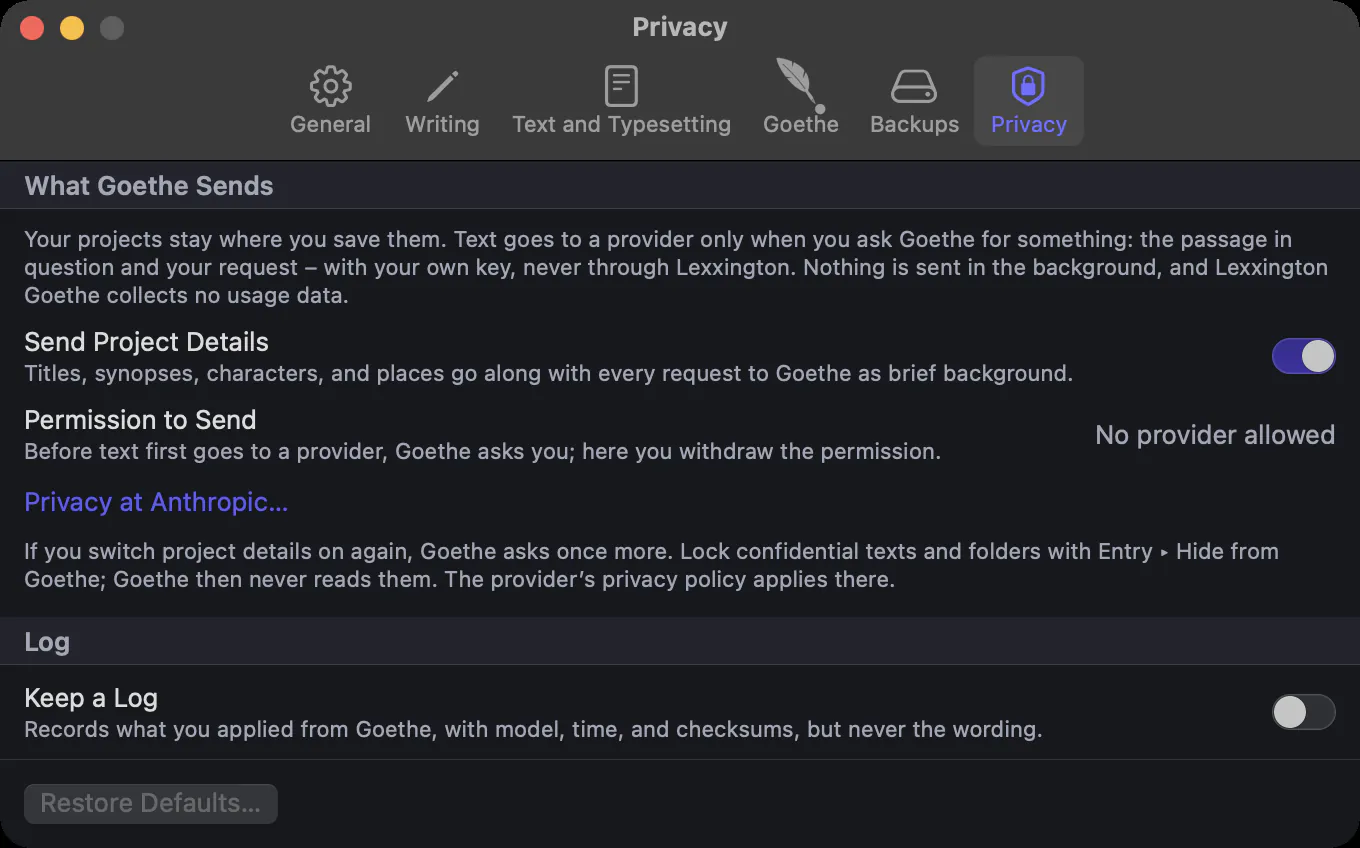
Goethe, the assistant, sends text only when you ask it something – straight from your Mac to the provider you chose, with your own key. Before the first request to a provider it asks your permission and says exactly what goes: the passage, your request and, if you allow it, a line each of project details. No detour through a Goethe server, no cookies, no cache, no redirects.
Keys in the keychain
Your AI key and the keys of your paired devices live in the system keychain and never in a file, a log or an error message. After saving, only the last four characters of the AI key are shown. Passwords for a protected PDF are asked for each output and kept nowhere.
Locks you set yourself
The client file must never go to any AI, whatever anybody clicks later.
Entry ▸ Hide from Goethe locks a text or a whole folder. Goethe never reads it – not as material, not as a source, not in the project details – and the window says when something was left out. Settings ▸ Goethe ▸ Privacy lists every permission with its date and lets you withdraw it. Keep a Log records each applied result with a checksum of the text before and after – without the wording.
This site, too
The pages of goethecloud.com use no analytics or advertising cookies and load nothing from other servers. A script hosted on this site saves your cookie choice only after you choose, for up to 180 days. You can change it through Cookie settings in the footer. The web server keeps its access logs for up to 14 days for security, then deletes them. Details are in the privacy policy.
Backups you can find
Your laptop dies a week before the deadline.
Goethe Write backs up each project automatically while you work and when you close it, keeps several generations, and lets you Back Up Now at any moment. Browse shows the backups with their dates; you bring back single texts or open the whole project from a backup. A second location – an external drive, a network share or a folder you sync yourself – gets a copy as well. Backups are ordinary files in the open format, so they open even without Goethe Write.
As a guest, nothing stays behind
When you join someone else’s project as a guest, the project is mirrored in a folder of its own in your Mac’s Application Support and opens only through the guest access. Nothing is saved as your own file. The host holds the project and decides.
Questions about privacy
Are my projects stored on your servers?
No. Projects are files on your device. Only when you share a read link does an encrypted copy go to Goethe Cloud, which cannot read it.
Does Goethe Write use my text to train AI?
No. Goethe Write sends text only when you ask Goethe, only to the provider you chose, with your own key. That provider’s terms apply there – read them before you allow it.
Can I use Goethe Write completely offline?
Yes. Without an AI key and without sharing, Goethe Write sends nothing. Even Goethe can run on your own server on the Mac.
Does the app collect usage data?
No. There are no analytics, no advertising and no tracking in the app.
Where are the backups?
On your Mac, in the program’s folder, and optionally in a second location you choose. Browse shows them with their dates.
Who can read a read link?
Anyone who has the link, because the key is in the link. Goethe Cloud cannot read it. Send it only to the people who should read.
Is the connection between two Macs encrypted in the same network?
Yes. Goethe Link encrypts everything end to end, in the same network as well as over the internet.
Read next
- Goethe, the AI assistant
 AIAn optional writing assistant with your own API key: revise, shorten, check, answer questions. Every change tracked, nothing sent without your yes.
- Working togetherGoethe Link: write together in the same network or over the internet, end-to-end encrypted. Live cursors, follow, chat, comments, suggestions, roles and sides.
- Privacy policyHow the app, Goethe Cloud and this site handle personal data.
Write without being watched.
Try Goethe Write free for 14 days on your Mac. Your projects never leave it unless you send them.
Try it free for 14 days on your MacRead the privacy chapterRead the privacy policy