Characters, places and a relationship map – the story bible inside your manuscript
Characters and places belong to the project, not to a separate notebook. Goethe Write knows where each of them appears, draws who stands to whom, and notices when the story contradicts itself.


The story bible that drifts away
Her eyes were green in chapter 2 and brown in chapter 19. The notebook said green – but the notebook was in another app.
Writers keep character notes somewhere: a document, a spreadsheet, a wiki. They are out of date by the second draft, because the story changes in the manuscript and the notes don’t follow.
How Goethe Write solves it
- Create a character or a place in the sidebar – empty, or from a Character Sheet or Place Sheet with fields such as role, age, goal, conflict and appearance.
- The profile in the inspector holds Other Names – nicknames and spellings, separated by commas, such as “Lena, Lenchen, Mrs. Berger”.
- Goethe Write finds the character in your text by all these names and counts the scenes she appears in. The sidebar shows the number.
- Connections link characters and places with texts: who appears here, where does it happen.
Other Names matter more than they seem: they are how the scene count, the search, the relationship map and the AI assistant know that “Lenchen” is Lena.
Who stands to whom
Twelve characters, three families, two secrets. You draw the diagram on paper, and by next week it is wrong.
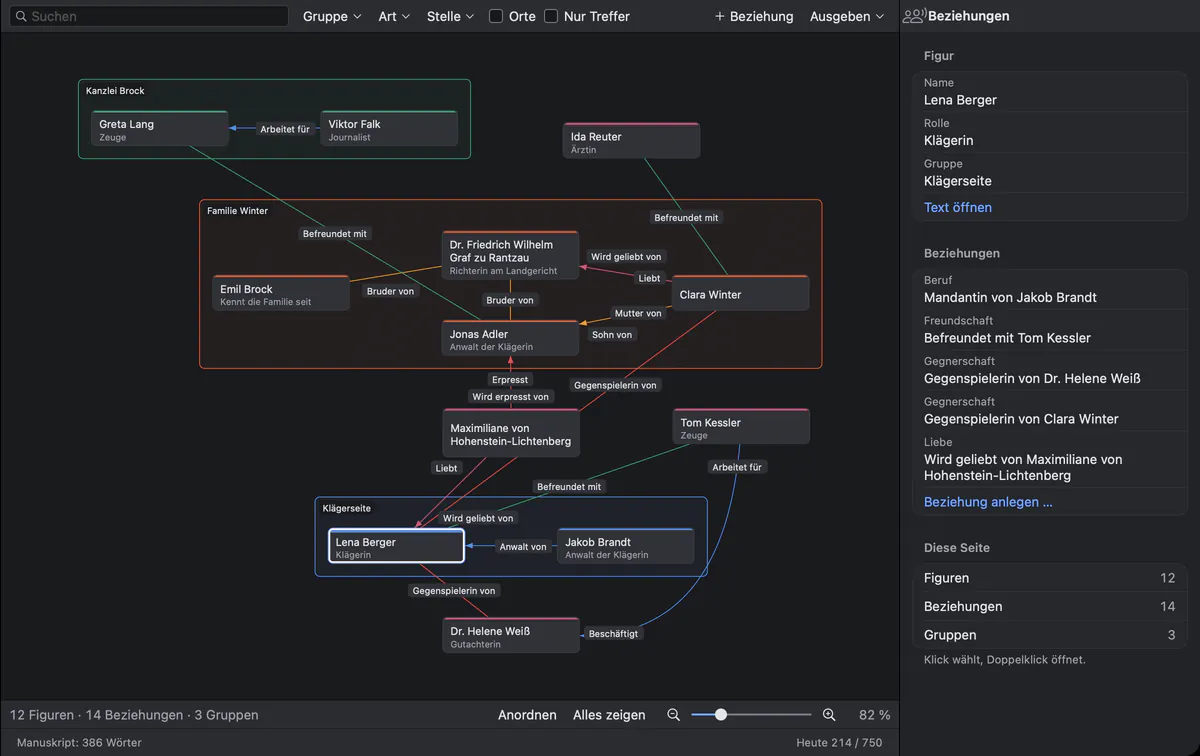
The relationship map draws characters as small cards, groups as frames and relationships as labelled lines.
How Goethe Write solves it
- Open Relationships in the tool line of the head.
- Choose Relationship and connect two characters. Pick a role from the catalogue – works for, brother of, lawyer of, antagonist of – or write your own.
- The reverse role is set by itself: whoever is mother of has a child of on the other side. The catalogue knows roles in other languages too.
- Group characters in families, firms or factions; a group is a frame on the map.
- Filter by group and by kind of relationship, search to dim the rest, zoom in and arrange. The inspector beside the map shows the selected character.
Threads, knowledge and rules
The detective uses the letter in chapter 9. She only finds it in chapter 11.
The Plot tools keep track of what usually lives in the author’s head:
From these, Goethe Write points out what breaks: a character who knows something before she learns it, a journey faster than the road allows, a scene that relies on something you just deleted. What breaks when you move or delete something? answers before you do it.
Analysis: who carries the story
Your protagonist is absent for a third of the book, and you only learn it from a reader.
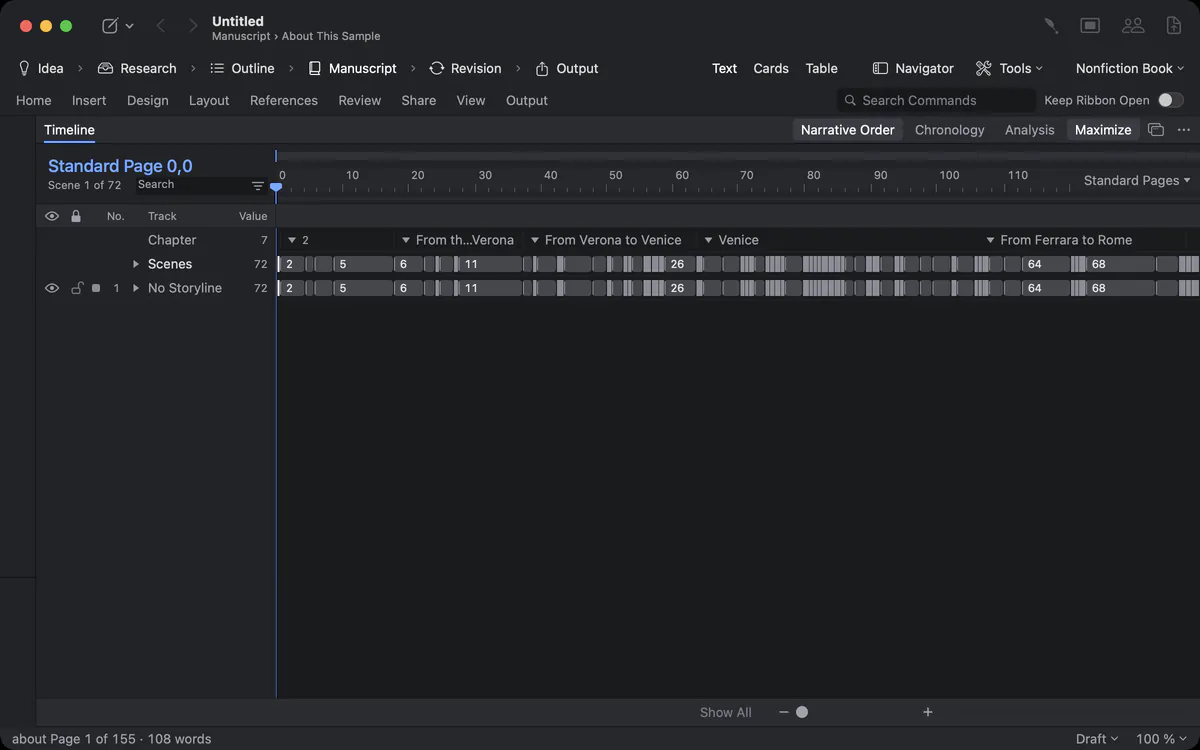
Analysis shows the tension arc, scene lengths, points of view and appearances: how often each character appears and where. Point of view, place and time of every scene come from the inspector and feed the table, the timeline and the analysis.
Found for you on import
You bring in a finished novel of 120,000 words, and nobody wants to type in forty characters by hand.
File ▸ Import ▸ Import Work… finds people, groups and places in a work and offers them as suggestions – on your Mac, without AI. You confirm what is right and remove the rest. See recognition on import.
A scene knows who, where and when
The checks can only find what they know. A scene without a place cannot be too far from the last one.
Select a scene, and the Scene section of the inspector shows its details: Point of View – who narrates, chosen from your characters or typed as a custom name for a narrator without a sheet; Place – where it is set; When – free text such as “Day 3, evening”, plus a date for the timeline; Storylines it belongs to; Threads it sets up or pays off; and under More Details its Tension and Conflict.
These few fields feed everything else. The table shows them as columns you can type into directly. The timeline places dated scenes in chronology and draws tension as a curve. The analysis counts points of view. And the plot checks need them: without Place and When, “Travel Too Fast” has nothing to report.
Templates for people and places
Every new character starts with the same twelve questions – and you type them every time.
A Character Sheet and a Place Sheet come with fields for role, age, goal, conflict and appearance, or for the look and the history of a place. Make your own entry templates with the fields your genre needs – a magic system, a ship’s crew list, a witness statement – and save a whole project as a template under My Templates for the next book of a series. Custom fields appear in the profile and as columns of the table.
Questions about characters and relationships
Does Goethe Write count how often a character appears?
Yes. It finds a character by her name and her other names and shows the number of scenes in the sidebar; Analysis shows the appearances across the work.
Can I make my own relationship types?
Yes. Choose a role from the catalogue or write your own. The reverse role on the other side is set by itself where it is known.
Can Goethe Write find contradictions in my story?
The plot checks find what the tools know about: knowledge used before it is learned, travel faster than your travel times, things that break when you move or delete a scene. Goethe, the assistant, can also look for contradictions about a character if you use it.
Can I export the relationship map?
Yes, the map can be exported as a picture.
Can a character have several names?
Yes. Other Names takes nicknames, titles and spellings, separated by commas. The scene count, the search, the relationship map and the assistant all treat them as the same person.
Do groups appear on the relationship map?
Yes. A group – a family, a firm, a faction – is a frame around its members, and you can filter the map by group.
Where do I set the point of view of a scene?
In the Scene section of the inspector, together with place, time, storylines and threads. The table shows the same fields as columns.
Read next
- TimelineScenes as clips on tracks for storylines, characters, places and points of view – in narrative order or chronology, measured in pages or words.
- Recognition on import
 No AI · offlineImport Work splits a finished work into chapters and finds people, groups and places on your Mac – without AI, with a preview, and undo in one step.
- Outline and structureAn outline you drag, a navigator for pages, contents and scenes, index cards, a table with your own columns, collections and a Beat Board.
Know your people.
Try Goethe Write free for 14 days on your Mac and open the sample novel under Help.
Try it free for 14 days on your MacRead the chapter on planning the storySee pricing