For students, PhD candidates and universities.
A thesis is a long text with a long tail: dozens of sources, footnotes on every page, and a deadline that does not move. Goethe Write keeps the sources next to the text and does the numbering for you.


Long papers fail in the details.
The hard part of a thesis is the argument. The tiring part is everything around it: finding the passage you highlighted three weeks ago, keeping footnotes in order after you move a chapter, making sure every work you cite is in the bibliography, and turning it all into the PDF your department asks for.
Goethe Write is a writing app for the Mac that treats a long paper as one project: chapters in an outline you can rearrange, research files in the same project, footnotes that count themselves, and a bibliography made from the works you enter.
Sources, footnotes, bibliography.
Switch on the Academic tool group under Project ▸ Tools…. It brings the Literature tool and Terms and Values.
- Literature, entered onceBooks, commentaries, articles, chapters in edited volumes and online sources, each with a short title. Every row shows how often the work is cited.
- CiteReferences ▸ Citations and Cross-References ▸ Cite inserts the short citation as a footnote, with page or margin number and a signal word such as “See”.
- Real footnotesInsert ▸ Footnote (⌥⌘F). Move a chapter, and every footnote counts anew. In Word they stay real footnotes.
- A bibliography that builds itselfSwitch on Bibliography under References ▸ Lists, and it follows the text in PDF, Word and print, sorted by authors.
- Contents with page numbersReferences ▸ Lists ▸ Table of Contents, one to four levels deep. A text called “Contents” at the start of the manuscript marks its place.
Citation styles: what there is today.
Better you read it here than after your first chapter.
- German legal style
- The standard style for the Literature tool.
- OSCOLA
- Used automatically when the project’s language is English.
- APA, MLA, Chicago, Harvard
- Not built in. If your department requires one of them, Goethe Write does not format it for you today.
- Page references in quotes
- Use Quote writes pages in the German form “S. 2”, in every interface language.
- Entering works
- You enter each work yourself in the Literature tool, with a preview of its bibliography entry.
Research beside the text.
PDFs in the project
File ▸ Add Files to Research… copies PDFs, images and documents into the project. Your originals stay untouched.
Highlight and quote
Highlight in five colors. Use Quote puts the passage into your text in quotation marks, with a footnote naming document and page.
Scans become text
Recognize Text uses the Mac’s own text recognition, German first, then English, so scanned pages become searchable and quotable.
Side by side
View ▸ Second Pane (⌥⌘↩) puts a PDF next to the chapter. Search Project (⇧⌘F) searches all research PDFs as well.
Your chapter and your source in one window.
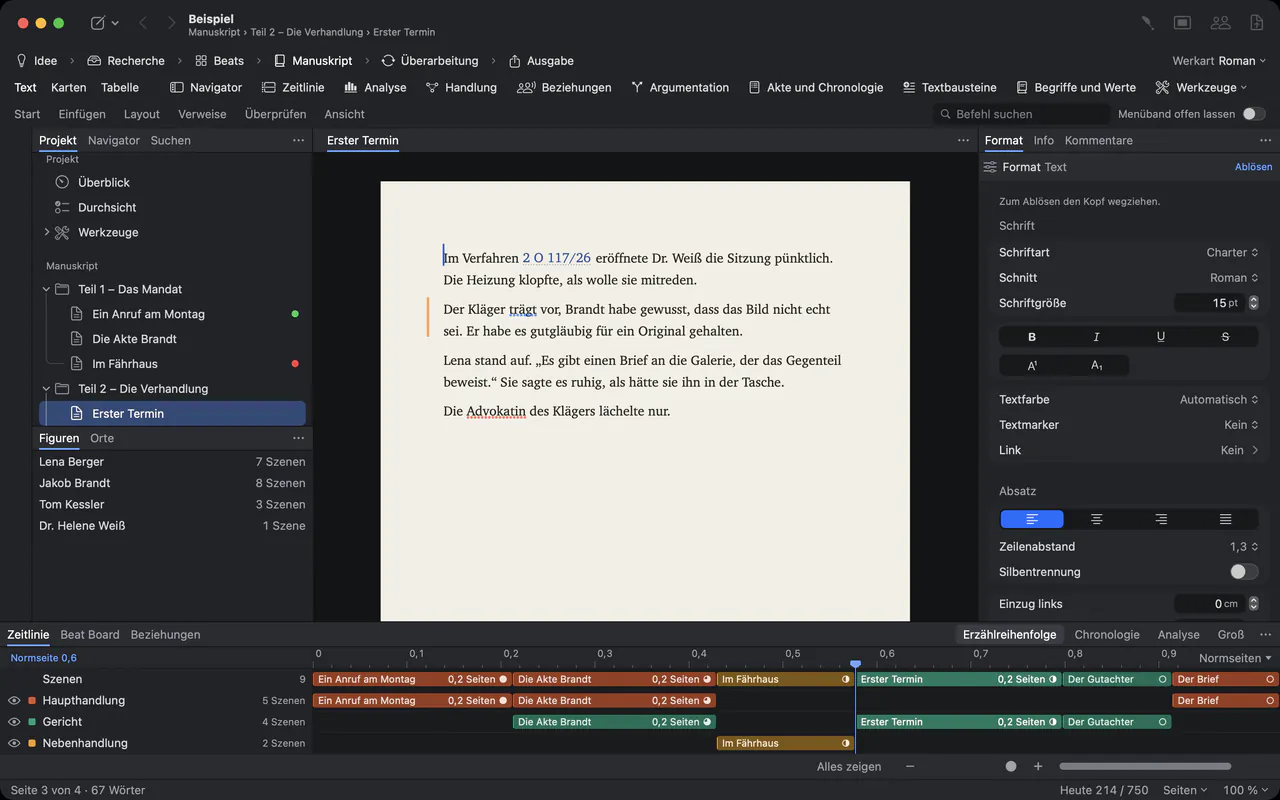
The window has three areas: the outline on the left, the page in the middle, notes and details on the right. View ▸ Arrangement ▸ Research (⌃⌘2) puts the last PDF beside the text, and Check Paragraph (⌃⌘P) later confirms that a quoted sentence really stands on the page you cite.
From the first chapter to submission.
- Deadline and daily targetProject ▸ Targets… holds the length of the work, the deadline with your writing days, and a daily target. Cutting text never puts you in the red.
- FocusView ▸ Focus (⇧⌘↩) leaves only the page, full screen.
- Feedback from your supervisorReview ▸ Send as Word… sends a .docx with comments and changes. Review ▸ Apply Edits… brings the corrections back as tracked changes.
- Snapshots and backupsReview ▸ Save Snapshot keeps a chapter as it is now. Backups run every 30 minutes while you work and when you close the project.
- ExportFile ▸ Export… (⌥⇧⌘E) writes PDF, Word, EPUB, Markdown or RTF. A first text called “Cover” becomes the title page. LaTeX export is planned, not built.
For law students.
The Law School Paper template (File ▸ New Project…) brings a cover page, an outline, a bibliography, a list of abbreviations, the case facts, the opinion with footnotes and the declaration of independent work, with four levels in the contents and the bibliography switched on. Its texts are written in German and follow German legal training. Legal numbering and margin numbers come with it.
Questions from students and universities.
May I use the writing assistant for my thesis? AI
That is your university’s rule, not ours. Goethe, the assistant, is part of Goethe Cloud and works with your own AI key. It changes nothing by itself: its suggestions arrive as tracked changes under the name “Goethe”, so you always see what came from it. With Keep a Log (Settings ▸ Privacy) it records every applied result, without the wording. Without a key, the app stays offline.
Does Goethe Write support APA, MLA or Chicago?
No. Literature is set in German legal style, or in OSCOLA when the project’s language is English. If you need another style, format the references by hand or finish them in Word.
Can I bring in a draft from Word?
Yes. File ▸ Import ▸ Word File… brings a Word file into a project with its headings, notes and comments.
Can I write my thesis on the iPad?
The iPhone and iPad app is free and opens projects from the Mac, but texts with footnotes or a source list open there for reading only. A thesis is written on the Mac.
How can a university license it?
Goethe Write for Teams costs US$29.99 per Mac seat, one-time, from five seats, delivered through Apple Business Manager. Students can buy it themselves for US$79.99 once, after 14 days free. Menus come in English and German.
Spend your time on the argument.
US$79.99 once for the Mac, with 14 days free. For universities, US$29.99 per Mac seat from five seats. Goethe Cloud adds collaboration, read links and the assistant with your own AI key, for US$4.99 a month or US$49.99 a year.