For law firms and lawyers.
A brief has to persuade and prove at the same time. Goethe Write keeps count of the outline, the footnotes, the exhibits and the cross-references, so your attention stays on the argument.


Every fact needs its proof.
Legal writing carries a double load. Every fact needs evidence, every legal view a citation, every exhibit the right number. Move one section, and by hand you renumber the outline, the cross-references (“see above under B. II. 1.”) and the exhibits. The longer the brief, the more of the day goes to counting instead of arguing.
Goethe Write is a writing app for the Mac with a type of work made for this: Law. Choose Project ▸ Type of Work ▸ Law, and five legal tools appear, along with the phases of legal work (Facts · Research · Outline · Brief · Revision · Output) and the commands for numbering, exhibits and citations. Your texts stay as they are, and you can switch back at any time.
One thing first: Goethe Write is a writing tool. It gives no legal advice, checks no law for you and does not replace your judgment.
The outline counts itself.
When you rearrange something, the app keeps the numbers right.
- Legal numberingA., I., 1., a), aa) and (1) on six levels, set with Home ▸ Paragraph ▸ Legal Numbering. ⌥⌘] and ⌥⌘[ move a point a level down or up, and everything after it counts along.
- Cross-references that followReferences ▸ Citations and Cross-References ▸ Cross-Reference points to a section. After a rebuild, “B. II. 1.” still names the right place.
- Exhibits in orderFiles in the Anlagen folder of the research are numbered in the folder’s order: K 1, K 2 … for the claimant, B 1 … for the defendant. References ▸ Citations and Cross-References ▸ Exhibit names one in the text. Reorder the folder, and every reference changes.
- Margin numbersLayout ▸ Header and Footer ▸ Margin Numbers numbers the paragraphs in the margin, in the page view and in the export.
- Real footnotesInsert ▸ Footnote (⌥⌘F). The numbers are never stored, so they always count right. In Word they stay real footnotes.
Five tools for the case.
They sit in the sidebar under Tools. Each is tied to the text and tells you what is missing.
Arguments
A map of claims, evidence, counterarguments, rebuttals and conclusions. It flags Evidence Missing and No Rebuttal beside each row.
Case File and Chronology
Events by date, with each side’s statements and their sources. If two statements give different times, the event says Conflicting.
Terms and Values
Case number, amount in dispute, client name: keep a value once and put it in the text with Insert ▸ Field. Change it, and every place changes, in the export too.
Clause Library
Standard wording with placeholders, conditions, variants and approvals that carry a name and a date. Usage shows where an older version still stands.
Literature
Commentaries, textbooks, articles and online sources, entered once. Cite sets the short citation as a footnote, and the bibliography builds itself.
Evidence you can check
References ▸ Citations and Cross-References ▸ Evidence… links a statement to a place in a document. Check Paragraph (⌃⌘P) looks whether the wording really stands there.
The brief and the file in one window.
Research sits beside the text. View ▸ Arrangement ▸ Research (⌃⌘2) opens the last PDF next to your brief. You highlight a sentence in the contract and click Use Quote: it lands in the brief in quotation marks, with a footnote naming the document and the page, and linked as evidence. Scanned pages become searchable with Recognize Text, which uses the Mac’s own text recognition.
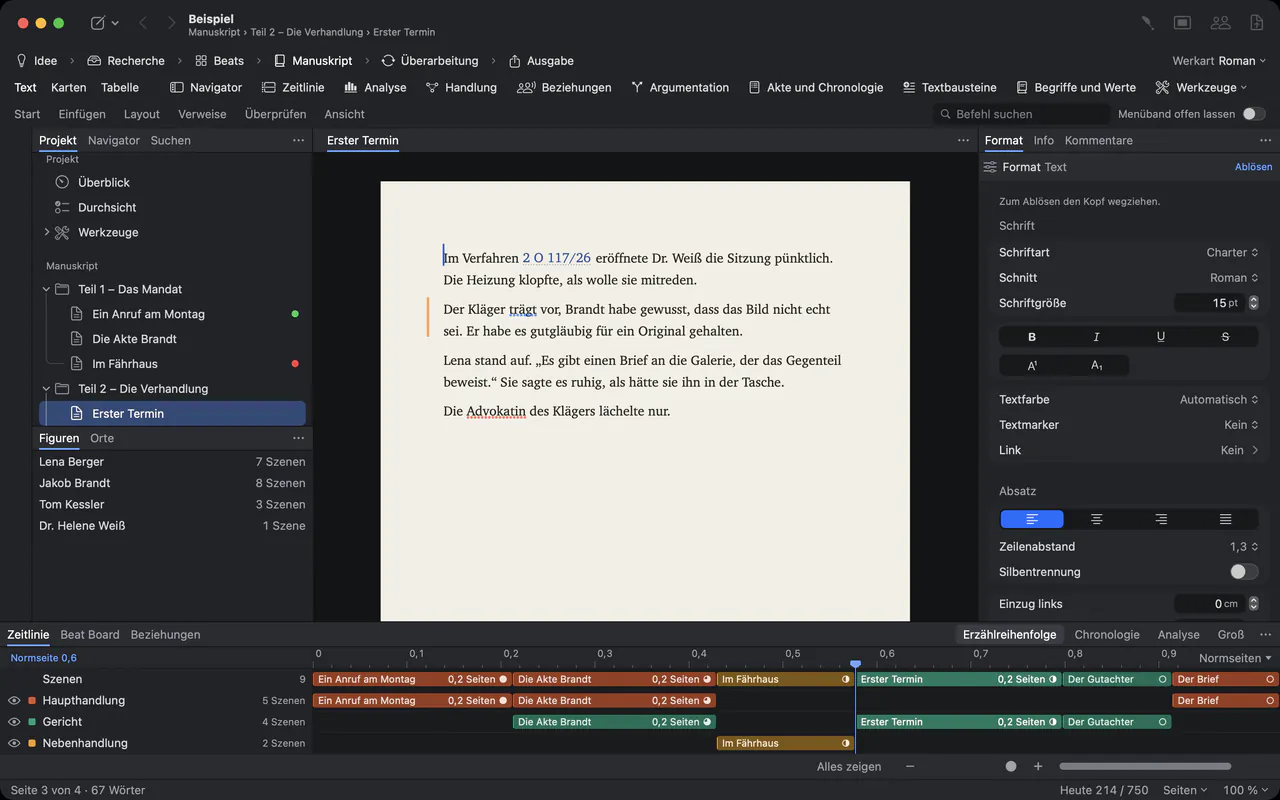
Revision with colleagues, and with firms that use Word.
- Track changesReview ▸ Track Changes (⇧⌘E) records who inserts and deletes what, in each person’s color. You accept or reject change by change.
- CommentsReview ▸ Comment (⇧⌘K) starts a conversation at a passage. It is ticked off when the point is settled.
- Send as Word, apply the editsReview ▸ Send as Word… exports a .docx with comments and changes. Review ▸ Apply Edits… brings the edited file back as tracked changes, after a snapshot of each text, without overwriting anything.
- Roles of the paragraphsReferences ▸ Citations and Cross-References ▸ Mark labels a paragraph as your own submission, the other side’s, undisputed, evidence or legal assessment. The evidence chain then shows which submission still lacks a source.
- A PDF for each recipientFile ▸ PDF per Recipient… writes one PDF per name on the recipient list, each with its own watermark.
Client files stay on your Macs.
Confidentiality is not a setting you have to find. It is how the app is built.
- Where projects live
- A project is one file, in the place where you save it. Goethe Write sends it nowhere.
- Nothing in the background
- The app collects no usage data and sends nothing by itself.
- The assistant is optional
- Goethe, the writing assistant, works only with your own key at a provider you choose. Without a key, the app stays offline. Entry ▸ Hide from Goethe keeps briefs with client data out of every request.
- Backups
- A ZIP of the whole project when you close it and every 30 minutes while you work, with an optional second location such as an external drive.
- Working together
- Goethe Link connects Macs on the same network, end-to-end encrypted. With Goethe Cloud, sharing works over the internet as well.
Questions from law firms.
Does Goethe Write give legal advice?
No. It is a writing app. It numbers, links and checks references; whether an argument holds is your call. Goethe, the optional assistant, is instructed not to invent case facts, citations, statutes or judgments and to mark a guess as a guess. It can still be wrong, and the responsibility for the text stays with you.
Which legal system is it made for?
The legal numbering (A., I., 1., a), aa), (1)), the four legal templates and the sample brief follow German practice, and the template texts are written in German. Literature is set in German legal style, or in OSCOLA when the project’s language is English. Other citation styles, such as the Bluebook, are not built in.
Can we exchange drafts with firms that work in Word?
Yes. Review ▸ Send as Word… sends comments and tracked changes as Word comments and changes, and Review ▸ Apply Edits… brings the answer back without overwriting your text. Fields are written out as their values.
What does the sample brief show?
Help ▸ Sample: Brief opens a statement of defence with footnotes, exhibits, values, an argument map, a chronology, evidence, a clause, comments and tracked changes. It is written in German.
How do we license it for the whole firm?
Goethe Write for Teams costs US$29.99 per Mac seat, one-time, from five seats, through Apple Business Manager. Your administrator assigns the seats, and nobody pays in the app. A single Mac costs US$79.99 once, with 14 days free.
Read the details in the handbook.
Leave the counting to the app.
US$79.99 once for the Mac, with 14 days free. For firms, US$29.99 per Mac seat from five seats. Goethe Cloud adds collaboration, read links and the assistant with your own AI key, for US$4.99 a month or US$49.99 a year.