For reports that many people write and many people read.
Annual reports, grant proposals, evaluations, policy papers: Goethe Write is a Mac app that keeps long reports in order, the figures consistent and the files on your own Mac – with review rounds and collaboration your team can trust.


Many authors, one report, sensitive material.
A report passes through many hands: program staff write sections, finance adds the figures, management comments, the funder wants Word, the public gets a PDF. On the way, a budget figure is changed in one place and not in another, and nobody knows which file is the latest.
Often the material is sensitive, too: names of beneficiaries, interview notes, internal assessments. It should stay where your organization decides.
Goethe Write gives the report one place, one record of every change and one set of figures that is right everywhere.
Your files stay where you put them.
- A file on your MacA project is one file. You decide where it lies, and Goethe Write sends it nowhere. The app collects no usage data.
- Backups that always runA ZIP of the whole project when you close it and every 30 minutes, with an optional second location such as an external drive.
- An open file formatThe format is publicly documented, so your reports stay readable without Goethe Write.
- AI only if you want it
 AIThe assistant Goethe is optional, works with your own key and asks before text goes to a provider. Entry ▸ Hide from Goethe keeps confidential folders closed to it.
Figures and references that agree.
Switch on the group Academic or Consulting under Project ▸ Tools… for the tools Terms and Values and Literature.
Values as fields
Enter the grant amount or the project number once and insert it as a field. Change the value, and every place changes.
Footnotes and sources
Real footnotes with Insert ▸ Footnote (⌥⌘F); with Literature, short citations and a bibliography made from your entries.
Cross-references
“See section 3” counts along when chapters move, and the export check reports references whose target is gone.
Table of contents
References ▸ Lists ▸ Table of Contents, up to four levels, clickable in the PDF.
The whole report in one window.
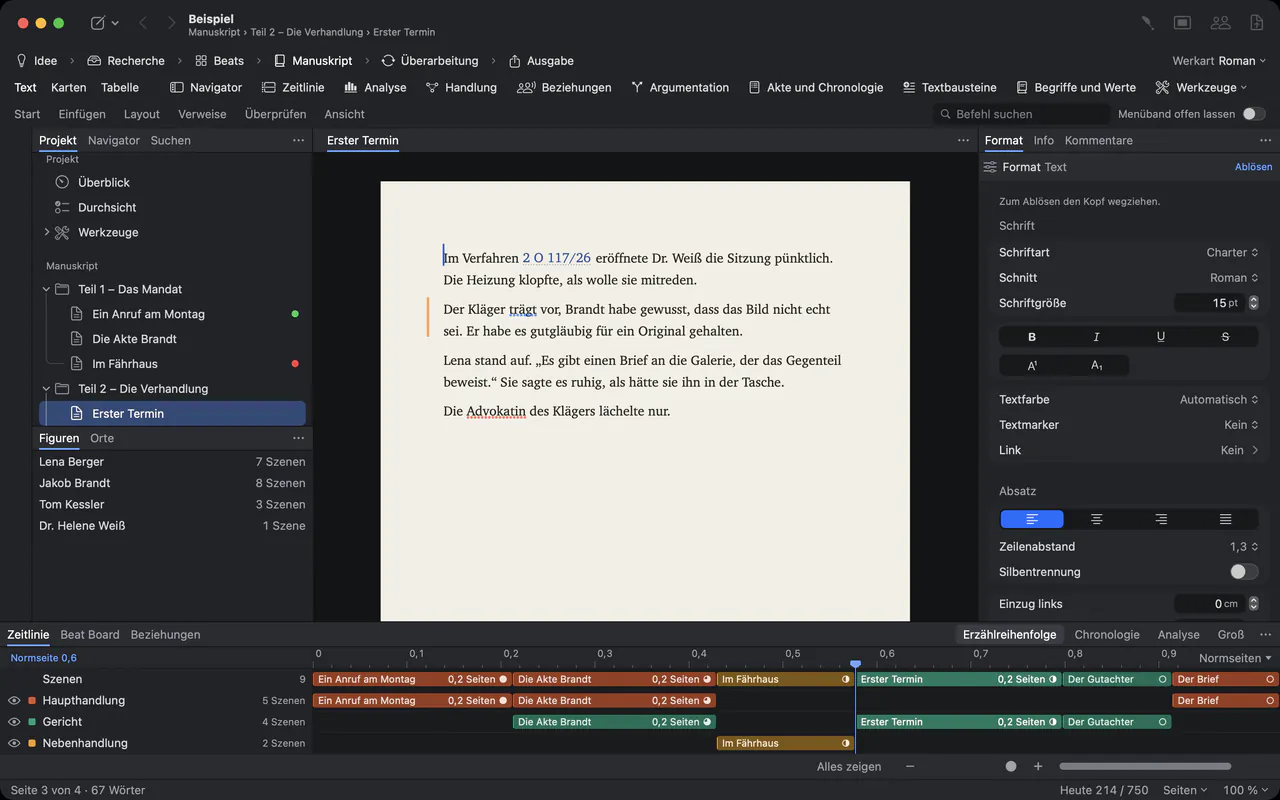
Each section is a text of its own in the outline on the left, with a status such as In Progress or Done – or your own, like “With finance”, under Project ▸ Custom Details….
Drag a section to another place, and its text moves with it. Write a one-sentence synopsis for each section, and the outline becomes a table of what each section says and how far it has come.
Review rounds with a record.
- Tracked changes and commentsReview ▸ Track Changes (⇧⌘E) records who changed what. Comments are conversations in the margin, ticked off when settled.
- Everything open in one listThe Review tool collects comments, questions, changes and notices that still wait for someone.
- Board members who use WordReview ▸ Send as Word… and Review ▸ Apply Edits…: their edits come back as tracked changes, after a snapshot of every text.
- Drafts marked as draftsA watermark such as “DRAFT” on every page, and File ▸ PDF per Recipient… for a separate copy for each name.
Writing together, encrypted.
With Goethe Cloud, a Mac shares the project with colleagues on the same network, end-to-end encrypted; devices are paired once by comparing six digits. One person writes in a text at a time, so no section is overwritten. Guests pay nothing.
Before a new person begins to write in a text, Goethe Write saves a snapshot, and when you switch on sharing it first quietly backs up the whole project.
For people who only need to read, a read link opens the report in any browser. The key is in the link, and Goethe Cloud stores only encrypted data.
What to check before you decide.
Goethe Write runs on the Mac; the free iPhone and iPad app opens texts with footnotes for reading only, and there is no Windows version. The handbook does not describe tagged or accessible PDF. If your publications must meet such a standard, test an export first – 14 days are free.
Questions from NGOs and public bodies.
Where is our data stored?
In the project file, wherever you save it, and in backups on the same Mac. Goethe Write runs no server your texts pass through when you write alone.
Can several colleagues work on one report?
Yes, with Goethe Cloud: a Mac shares the project, the others join as guests without a subscription of their own. One person writes in a text at a time.
Can we deliver Word files to funders?
Yes. Export as Word with headings, real footnotes and page numbers, or use Send as Word to get comments and changes back.
Can we use our own report template?
Import a Word file with its page, header and footer, then save the project as a template of your own for the next report.
Is there a price for organizations?
Goethe Write for Teams costs US$29.99 per Mac seat, one-time, from 5 seats, delivered through Apple Business Manager.
Write the next report in Goethe Write.
US$79.99 once for the Mac, with 14 days free. For organizations: US$29.99 per Mac seat from 5 seats.