Legal brief writing software for Mac: what a brief needs from it.
Goethe Write is a Mac app for writing briefs, legal opinions and law papers on real pages. Its legal numbering renumbers itself, paragraphs carry margin numbers, exhibits count themselves, a case file keeps the chronology, and amounts appear as fields that change everywhere at once. The numbering, the templates and the citation style follow German practice today. It is a writing tool, not legal advice.


The short answer.
Most lawyers on a Mac write briefs in a general word processor, and that works – until the outline has to be renumbered by hand at midnight, an exhibit is inserted between K 3 and K 4, or the amount in dispute appears eleven times and changes once. Legal brief writing software should take that counting off your hands, so your attention stays on the argument.
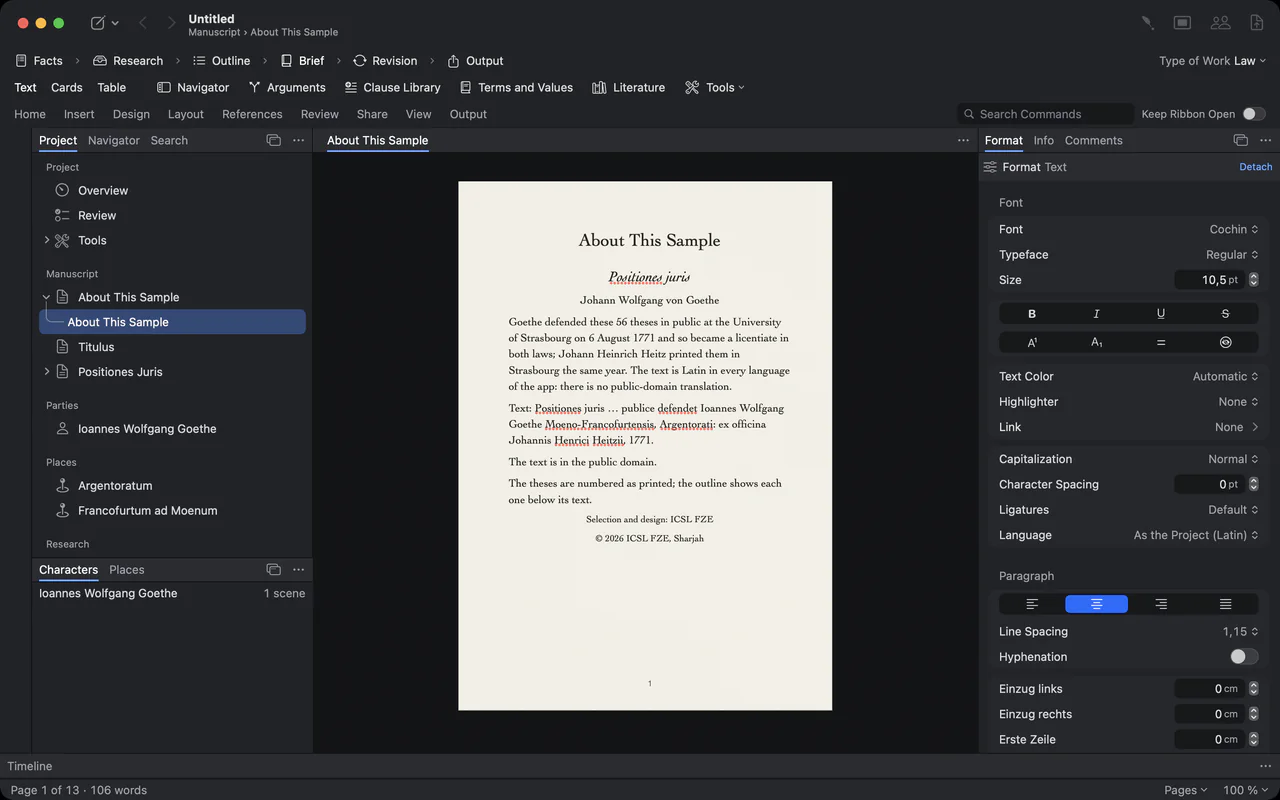
Goethe Write does this with a type of work called Law. Choose Project ▸ Type of Work ▸ Law, and the window shows the phases of legal work – Facts · Research · Outline · Brief · Revision · Output – the sidebar gains five legal tools, and the ribbon gains Legal Numbering, Renumber, Mark, Exhibit, Margin Numbers, Clause, Cite, Cross-Reference and Bibliography. The type of work changes nothing in your texts, and you can switch it at any time.
One thing to know first: the outline levels, the four legal templates and the citation style are built on German legal practice. Margin numbers, exhibits, footnotes, fields, the case file and the clause library work for any legal writing.
Six things to look for in brief writing software.
Whichever program you choose, these are the jobs it should do for you. Here is how each one works in Goethe Write – with the exact menu paths, so you can check them yourself during the free trial.
- 1. An outline that renumbers itselfChoose Home ▸ Paragraph ▸ Legal Numbering (or Format ▸ Lists ▸ Legal Numbering). Six levels count A., I., 1., a), aa) and (1). Increase Indent (⌥⌘]) and Decrease Indent (⌥⌘[) move a point a level down or up, and everything after it counts along.
- 2. Paragraphs a court can citeLayout ▸ Header and Footer ▸ Margin Numbers numbers the paragraphs in the margin, on screen and in the export, so a reader can refer to “para. 12” and find it.
- 3. Exhibits that count themselvesPut the files into the Anlagen folder of your research; they are numbered in its order – K 1, K 2 and so on. Set the letter under Terms and Values ▸ References ▸ Exhibit Prefixes and insert a reference with References ▸ Citations and Cross-References ▸ Exhibit. Rearrange the exhibits, and every reference follows.
- 4. Amounts that read the same everywhereEnter a value once under Terms and Values – a case number, the amount in dispute, a name – and insert it with Insert ▸ Field. Change it once, and every occurrence changes, in the export too.
- 5. Evidence behind every assertionReferences ▸ Citations and Cross-References ▸ Mark gives a paragraph its role – own submission, other side’s submission, undisputed, evidence or legal assessment. Evidence… ties a statement to the place in a document that carries it, and Check Paragraph (⌃⌘P) looks for the original wording there.
- 6. Cross-references that survive a rebuildReferences ▸ Citations and Cross-References ▸ Cross-Reference points to a section and shows its current number. “See above under B. II. 1.” stays right after you move parts around.
A brief on real pages, with the ribbon you expect.
You write on the page as it will be printed, with heading styles Heading 1 to Heading 6 (⌥⌘1 to ⌥⌘6) that are the levels of your outline. The sample shown is Goethe’s own: the 56 legal theses he defended in Strasbourg in 1771, set as a legal text.

The ribbon’s Home tab: clipboard, font, paragraph, styles gallery and Find

The style gallery: Body Text, Chapter, Subchapter, Section and Block Quote, each shown in its own type
From the case file to the finished brief.
A brief has to persuade and prove at the same time. The five tools of the Law group sit in the sidebar under Tools and are tied to your text: a link to a passage follows it while you keep editing, and each tool tells you what is missing.
- Case File and ChronologyEvents in order of date, each with what each side asserts about it and the source. If two statements give different times, the event says Conflicting – exactly the point you have to prove cleanly. Evidence Chains shows every marked submission still without a source.
- ArgumentsA map of claims, evidence, counterarguments, rebuttals and conclusions. Beside each row it says Evidence Missing or No Rebuttal, and one sentence at the top sums up the gaps.
- Terms and ValuesValues that must read the same everywhere, defined terms that are found in every text including inflected forms, and the references and exhibits that have lost their target.
- Clause LibraryRecurring wording with placeholders, conditions and variants. Approve a version with your name and date; when a newer approved version exists, the brief that uses the clause shows it under Updates, and Compare… lets you take it, merge it with your own changes or keep yours.
- LiteratureCommentaries, books, articles and online sources, entered once. References ▸ Citations and Cross-References ▸ Cite inserts the short citation as a real footnote, and References ▸ Lists adds a table of contents with up to four levels and a bibliography to the export.
Compared with the word processor everyone has.
Many briefs are still written in Microsoft Word, and many firms will keep using it. Here are the published facts side by side.
| Goethe Write | Microsoft Word | |
|---|---|---|
| Availability | On the Mac App Store | Available now |
| Systems | Mac (macOS 15 or later); free app for iPhone and iPad (iOS and iPadOS 26 or later) | Windows, Mac, iPhone, iPad, Android and the web |
| Pricing model | One-time purchase of US$79.99 on the Mac, 14 days free; Goethe Cloud US$4.99 a month or US$49.99 a year | Microsoft 365 Personal US$99.99 a year or US$9.99 a month; Office Home 2024 US$179.99 once for one PC or Mac; Word for the web free |
| Files | Imports Word, OpenDocument, Markdown, PDF and more; exports PDF, Word, RTF and more | Word documents (.docx) as standard; also saves PDF, RTF, plain text and web pages |
| Working together | In the same network without the internet, or over the internet; end-to-end encrypted; guests are free | Real-time co-authoring with Microsoft 365 and on the web; not in Office 2024 |
Sources: Microsoft 365: compare all plans, Microsoft Support: real-time co-authoring in Word, Microsoft Support: file formats for saving documents.
Checked 13 Nov 2026 on microsoft.com. Microsoft Word is a trademark of its owner; Goethe Write is not affiliated with it.
Where Word is ahead – and how the two work together.
Word runs on every system, it is what courts, clients and opposing counsel send around, and real-time co-authoring with Microsoft 365 is effortless. If your whole firm lives in Word and your briefs are short, that may be all you need.
Goethe Write does not ask anyone else to change. It opens Word files and exports them; footnotes stay real footnotes in Word and RTF, and values are written out in the export. The difference is in the writing itself: the outline, exhibits, cross-references, footnotes and bibliography are kept for you, and the facts of the case sit beside the brief instead of in another file.
Revision in one place.
In the Revision phase, notices, comments, questions, tracked changes and evidence stand together. The optional assistant, Goethe, has jobs for legal texts – Check Opinion Style and Suggest Evidence leave comments, they never change the text on their own – and client material locked with Entry ▸ Hide from Goethe is never read. Without your own AI key, Goethe Write sends nothing at all.


The ribbon’s Review tab: spelling, comments, track changes and snapshots

The ribbon’s Layout tab: margins, orientation, paper size, header and page numbers
What to know before you switch.
The six numbering levels follow the German outline (A., I., 1., a), aa), (1)). The four templates – Complaint, Legal Opinion, Law School Paper and Journal Article – have their template texts in German today; their names are translated. The Legal Opinion template is built on the four steps of the German opinion style. Literature is cited in German legal style; in a project whose language is English, the style is OSCOLA. The fully filled sample under Help ▸ Sample: Brief is written in German.
Goethe Write helps you write and organise a legal text. It does not research the law, check whether an argument holds, or give legal advice – that stays with you. You don’t need the Law type of work to use the tools: Project ▸ Tools… switches them on in any project.
Questions about legal brief writing on the Mac.
Is there legal brief writing software for the Mac that numbers the outline automatically?
Goethe Write does: Home ▸ Paragraph ▸ Legal Numbering counts A., I., 1., a), aa) and (1) and follows every change of level or order. Renumber counts everything again after a large rearrangement.
Does it work for legal systems other than Germany’s?
Partly. The numbering levels, the templates and the citation style follow German practice today; an English-language project cites in OSCOLA style. Margin numbers, exhibits, footnotes, fields, the case file, the clause library and cross-references work for any legal writing.
Can I exchange briefs with colleagues who use Word?
Yes. Goethe Write opens Word files and exports them. Footnotes stay real footnotes in Word and RTF, and values inserted as fields are written out in the export.
Can amounts and dates be kept consistent across a brief?
Yes. Enter them under Terms and Values and insert them with Insert ▸ Field. Change the value once, and every occurrence follows. A value you merely typed does not change along.
Does Goethe Write give legal advice or check my arguments?
No. It keeps numbering, exhibits, references and evidence in order and shows where evidence or a rebuttal is missing. Whether the argument holds is your judgement.
Can I keep client data away from the AI? AI
Yes. The assistant is optional and needs your own key; without it, nothing is sent. With it, Entry ▸ Hide from Goethe locks a text or folder so Goethe never reads it.
Leave the counting to the app.
Try Goethe Write free for 14 days on the Mac, then US$79.99 once. Goethe Cloud adds collaboration over the internet, read links and the Goethe assistant on your own AI key, for US$4.99 a month or US$49.99 a year. The iPhone and iPad app is free. For firms: US$29.99 per Mac seat from five seats.
Pricing and free trialGoethe Write for TeamsRead the legal chapter