For manuals, guides and long documentation.
Goethe Write is a Mac app for long, structured texts. For technical writers it brings an outline built from real styles, values you maintain in one place, cross-references that count along, and clean PDF, Word and Markdown – but it is not a docs-as-code system.


Documentation changes faster than it is written.
A manual has a hundred sections, a product name that may change before launch, version numbers in thirty places and references like “see section 4.2” that break as soon as someone moves a chapter. Reviewers want Word, readers want a PDF, the website wants Markdown.
Goethe Write takes care of the structure, the recurring values and the review rounds, so that you can concentrate on what the reader needs to understand.
Structure you can see and move.
Goethe Write reads the outline from the styles. What you set as a heading appears in the sidebar below its text; dragging it moves the whole section.
- Eight real stylesBody Text, Heading 1 to 6 and Block Quote, set with ⌥⌘0 to ⌥⌘7. Change a style once under Format ▸ Style ▸ Edit Styles…, and every paragraph in every text follows.
- The NavigatorView ▸ Show Navigator (⌃⌘N) shows the contents with page numbers. Detach it to a second display and reorder chapters there.
- Bring in what existsFile ▸ Import ▸ Word File… takes over headings, footnotes, comments, tracked changes and pictures. A long single text becomes a tree of chapters with Entry ▸ Split at Headings.
- Status for every sectionIdea, In Progress, Revised, Done – or your own steps such as “With engineering” under Project ▸ Custom Details…. A saved search collects everything not yet done.
Say it once, use it everywhere.
Under Project ▸ Tools… switch on the group Academic or Consulting. It brings the tool Terms and Values, which keeps recurring words and numbers consistent.
Values as fields
Enter the product name or the version once and insert it as a field. Change the value, and every place changes, in the export too.
Defined terms
Write a definition for a term. The tool shows every place it occurs and marks the term when the definition changes, until you have checked them all.
Cross-references
References ▸ Citations and Cross-References ▸ Cross-Reference points to a section and counts along when you rearrange. The export check finds references whose target is gone.
Search and replace the project
Search Project (⇧⌘F) searches every text, comment and research PDF, with regular expressions if you like. Before “Replace All”, each affected text is saved as a snapshot.
One window for the whole document.
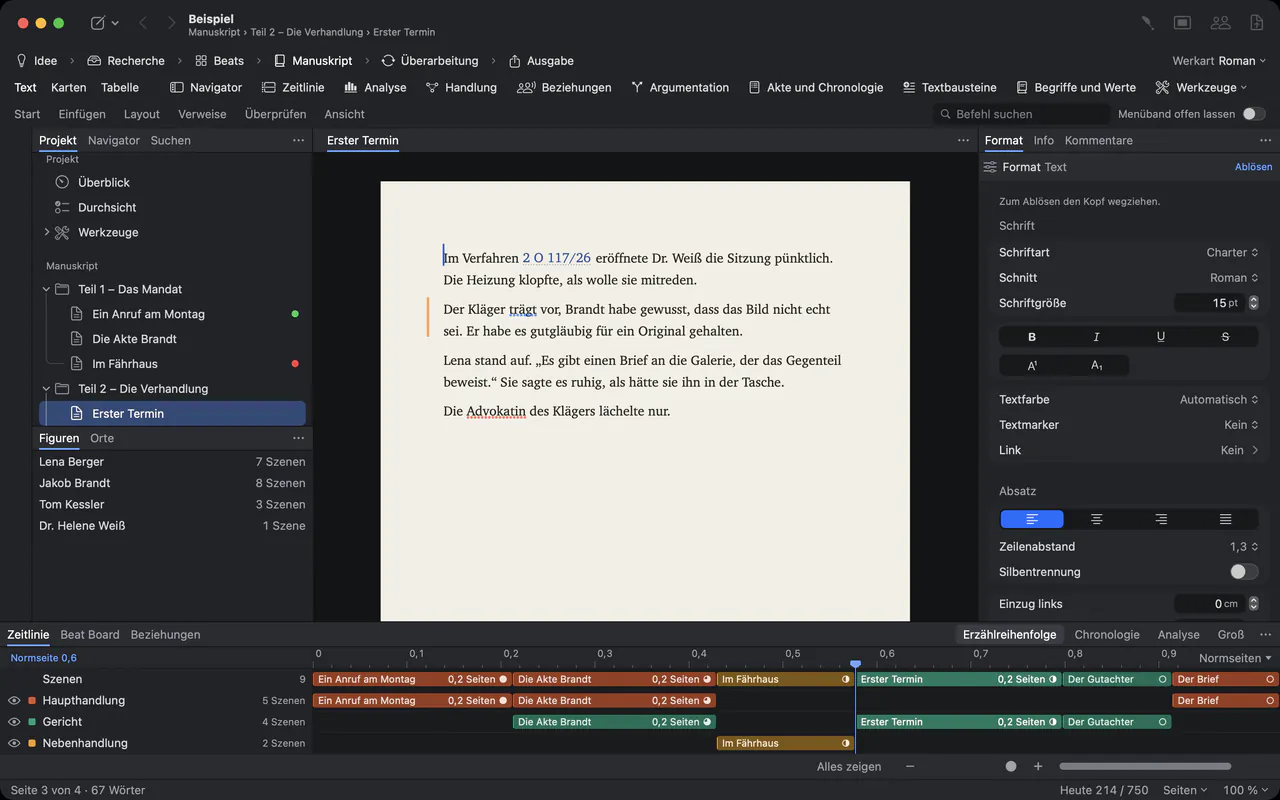
The sidebar holds the outline, the middle the page as it will print, the Inspector the format of the paragraph you are in. Footnotes are real footnotes: Insert ▸ Footnote (⌥⌘F) numbers them anew whenever you move one.
One source, several outputs.
File ▸ Export… (⌥⇧⌘E) opens one dialog for every format. Before anything is written, it lists what would come out wrong: empty texts, missing values, broken cross-references, open comments.
- Pages with header, footer and page numbers; a clickable table of contents, and every heading a bookmark
- Word (.docx)
- Headings, real footnotes, tables and pictures; comments and tracked changes go along if you want
- Markdown
- Headings, quotes, links and footnotes as Markdown footnotes – pictures are not included
- EPUB and RTF
- An e-book with a table of contents, or formatted text for any word processor
- Custom formats
- Save file type, look and page once with Save as Custom Format… and reuse it in every project on this Mac
Headers and footers take fields such as ‹Title›, ‹Date› and ‹Page Number› under File ▸ Page Setup… (⇧⌘P).
Review rounds without losing a word.
Switch on Review ▸ Track Changes (⇧⌘E) and every insertion and deletion is recorded with name and date. Engineers who work in Word get the file through Review ▸ Send as Word…; Review ▸ Apply Edits… brings their changes back as tracked changes and their comments as comments, after saving a snapshot of each text.
With Goethe Cloud, colleagues join your project as guests on the same network, end-to-end encrypted; being a guest is free. Read links let reviewers without the app read and comment in a browser.
What Goethe Write is not.
Goethe Write is a writing app, not a documentation platform. It has no DITA or XML authoring, no conditional text for several product variants, no documentation generated from source code and no publishing to a help center. Markdown export is a way out, not a round trip.
If your team works docs-as-code, keep that pipeline and use Goethe Write where long prose is written: concepts, white papers, handbooks and reports.
Questions from technical writers.
Can I keep a product name in one place?
Yes. Switch on Terms and Values under Project ▸ Tools…, create a value and insert it as a field. When the value changes, every field and the export change with it.
Does the PDF have a table of contents and bookmarks?
Yes. Switch on References ▸ Lists ▸ Table of Contents and choose up to four levels. In the PDF the table is clickable and every heading is a bookmark.
Can I export to Markdown for our website?
Yes: headings, quotes, bold, italics, links and footnotes. Pictures are not included in Markdown, and the table of contents is left out.
Does it replace a docs-as-code tool or a CMS?
No. There is no DITA, no conditional text and no publishing to a help center. Goethe Write is for writing and reviewing long documents.
Can I work on the iPhone?
The free iPhone and iPad app opens Goethe projects, but texts with footnotes or pictures open there for reading only. Long documentation is written on the Mac.
Write the next manual in Goethe Write.
US$79.99 once for the Mac, with 14 days free. Goethe Cloud for working together: US$4.99 a month or US$49.99 a year.