For the long piece, and the book that follows.
Goethe Write is a Mac app for journalists who write long: features, investigations, series and the book that grows out of them. It keeps documents, quotes and drafts in one project and hands the finished text to the desk as Word, PDF or Markdown.


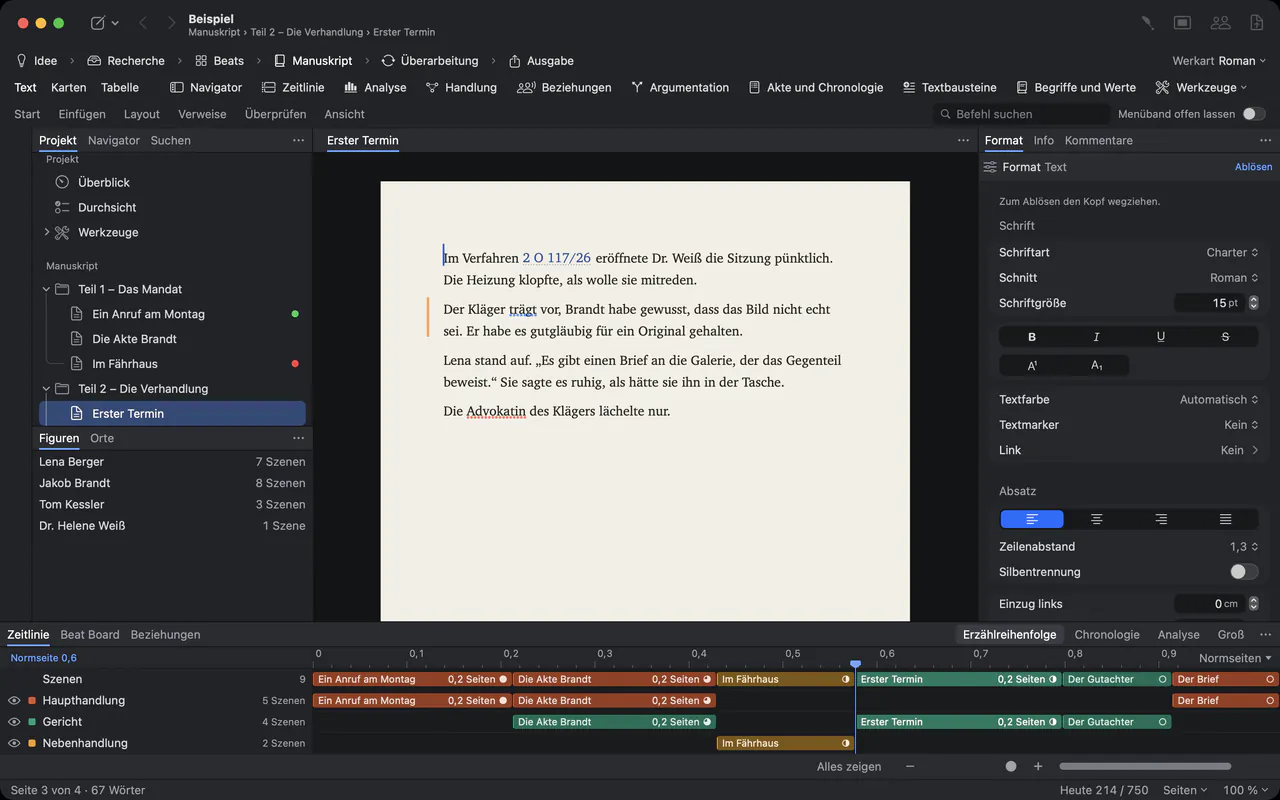
What it is, and what it is not.
Your newsroom’s content management system is built to publish: headlines, teasers, slots, the homepage. It is not built for the six weeks before that, when a piece is a pile of documents, interview notes and three competing structures. That is where Goethe Write works.
To be plain about it: Goethe Write is not a CMS. It does not publish to your website, does not take wire copy and does not plan pages or shifts. It is the place where a long text is researched, written, checked and edited – and then it leaves as a Word file, a PDF or Markdown that you paste into the system you already use.
The documents sit beside the text.
Every project has a Research section next to the manuscript. Bring in what the story rests on with File ▸ Add Files to Research…: PDFs, scans, photographs, Word files, audio and video. Your originals on disk stay untouched.
- Scans become searchableA scanned PDF has no text of its own. Click Recognize Text, and the Mac’s own text recognition makes the pages searchable and quotable, with page numbers. It needs no AI key.
- Quotes with their pageHighlight a passage in a PDF and click Use Quote: it lands in your text in quotation marks, with a footnote naming the document and the page, and stays linked to its source.
- Statements checked against the sourceSwitch on the Academic tools under Project ▸ Tools…. Then References ▸ Citations and Cross-References ▸ Evidence… links a statement to the passage that carries it, and Check Paragraph (⌃⌘P) looks whether that wording really stands in the document.
- Source and draft side by sideView ▸ Second Pane (⌥⌘↩) opens a PDF, a note or another text next to the piece you are writing.
- Recordings stay with the storyAudio and video files sit in Research and play in the Mac’s preview. Goethe Write does not transcribe them; bring a transcript in as a text of its own.
Who is connected to whom.
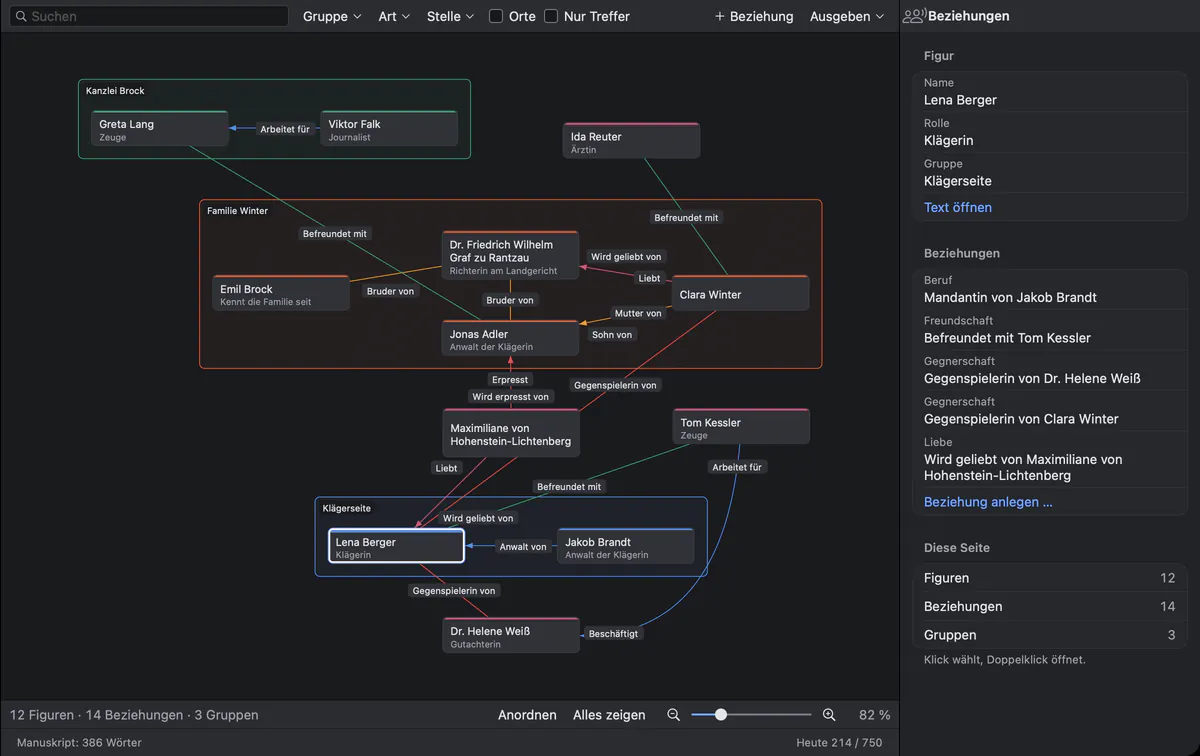
For an investigation with many names, the Relationships tool draws people as cards and their connections as labeled lines, such as “works for” or “brother of”. It belongs to the fiction tools, but under Project ▸ Tools… you can switch it on by itself in a nonfiction project too.
Through the edit without losing a word.
Editors work in different ways. Goethe Write meets them where they are, and keeps every state of the text.
Comments
Select a passage and choose Review ▸ Comment (⇧⌘K). Replies form a conversation; a resolved comment stays readable.
Tracked changes
Review ▸ Track Changes (⇧⌘E) records who inserts and deletes what. Accept or reject one by one, or all changes of one person.
Word, both ways
Review ▸ Send as Word… sends comments and changes as real Word comments. Review ▸ Apply Edits… brings the edited file back as tracked changes under the editor’s name; nothing is overwritten.
Snapshots
Review ▸ Save Snapshot before the big cut. Review ▸ Compare… shows what came in and what fell out, paragraph by paragraph, and brings single paragraphs back.
Lengths and deadlines, counted exactly.
Commissions come with a length and a date. Goethe Write counts both the way editors do.
- Word Count
- Review ▸ Word Count … shows pages, words, characters with and without spaces, paragraphs and footnotes – for a selection, a text, a folder or the whole manuscript.
- Limits
- Under Project ▸ Targets … set the manuscript to at most so many characters or words. The app then shows how much room is left, or how far you are over.
- Deadline
- With a deadline and your writing days, the app works out how many words each day needs. The quota is set at the start of the day and does not shrink while you write.
- Per piece
- Every text and folder can carry its own word target in the Inspector, with a small ring in the sidebar that fills as you write.
Confidential stays confidential.
Goethe, the writing assistant, is optional and works with an AI key of your own, from a provider you choose. Without a key, Goethe Write stays completely offline. With one, text goes out only when you ask, and only to that provider.
Texts and folders you mark with Entry ▸ Hide from Goethe are never sent – not as material, not as a source. Use it for interview notes and anything that could identify a source. When you work with a colleague through Goethe Link, everything between the devices is end-to-end encrypted, and a read link carries its key only in the link itself.
Goethe is instructed not to invent names, dates, amounts or quotations; where it has to guess, it marks the guess in square brackets. Its suggestions arrive as tracked changes that you accept or reject. Checking the facts stays your job.
When the series becomes a book.
Many long investigations end as a book. Set the project to Nonfiction Book under Project ▸ Type of Work, and the outline shows your chapters as a table with status, words and synopsis. Footnotes are real footnotes; with the Academic tools, Literature builds the bibliography from the works you cite.
When the manuscript goes to a publisher, File ▸ Export… writes Word with footnotes and comments, a standard manuscript, a PDF or an EPUB e-book, with a preview and a check of what is still open.
Questions from journalists.
Is Goethe Write a newsroom CMS?
No. It does not publish to websites, handle wire copy or plan editions. It is a writing app for long texts; finished pieces leave as Word (.docx), PDF, Markdown, Rich Text or EPUB for whatever system your newsroom uses.
How does a piece get into our CMS?
Export it. Markdown keeps headings, emphasis, links and footnotes as plain text; Word keeps footnotes, tables and images; Rich Text opens in almost any program. HTML export is planned but not built yet.
Can several reporters work on the same piece?
Yes, with Goethe Link. The Mac that has the project open shares it, and colleagues join as guests, on the same network or with an invitation link. In a text one person writes at a time, while the others read along, comment and suggest changes. Sharing belongs to Goethe Cloud; guests pay nothing.
Will Goethe write the article for me?
No, and it is not meant to. Goethe can shorten a passage by about a third, rephrase it in a more factual or simpler tone, suggest five titles or summarize a document. Each suggestion is a change you accept or reject. Goethe needs Goethe Cloud and your own AI key.
Can I write on my iPhone?
The free iPhone and iPad app opens Goethe projects and lets you write plain texts in them, with bold, italic and underline. Texts with footnotes or pictures open for reading only; you edit those on the Mac.
Write the long piece in peace.
14 days free on the Mac, then US$79.99 once. Goethe Cloud adds working together, read links and Goethe for US$4.99 a month or US$49.99 a year. Newsrooms buy Goethe Write for Teams: US$29.99 per Mac seat, from 5 seats.