For schools and teachers.
Teachers write a lot: course material, letters, reports and feedback on essays. Students write their first long texts. Goethe Write gives both a quiet page, and this page also says plainly what it is not built for.


Writing well takes quiet, and feedback.
In school, writing competes with notifications, tabs and the next app. Feedback travels as notes in the margin or as Word files that come back in another version. And once an AI assistant is in the room, the first question is who wrote what.
Goethe Write is a writing app for the Mac, with a free companion app for iPhone and iPad. It is not a learning platform: it has no classes, no grade book and no way to hand in assignments. What it has is a quiet page, feedback that stays at the passage, and an assistant that stays off unless someone sets it up.
A quiet page.
- FocusView ▸ Focus (⇧⌘↩) turns the window into the page alone, full screen. Nothing moves, nothing blinks.
- Targets that encourageProject ▸ Targets… sets a length, a deadline and a daily target. The app counts how much the text grew today; cutting never puts a writer in the red.
- Spelling and grammarThe Mac’s own spelling and grammar check, under Edit ▸ Spelling and Grammar, with checking while typing switched on from the start.
- Structure for long textsChapters and sections in an outline you can drag, each with a status and a synopsis, so a long essay is planned before it is written.
Feedback at the passage.
The same tools editors and publishers use, for a class essay or for course material written by several teachers.
Comments
Review ▸ Comment (⇧⌘K) on a passage. The writer replies, and the comment is ticked off when the point is settled.
Tracked changes
Review ▸ Track Changes (⇧⌘E) shows insertions underlined and deletions struck through, in each person’s color. The writer accepts or rejects.
Snapshots
Review ▸ Save Snapshot keeps a draft as it is. Later you compare two snapshots and see how the text has grown.
Word in both directions
Review ▸ Send as Word… and Review ▸ Apply Edits… for everyone who works in Word or Pages.
One window, three areas.
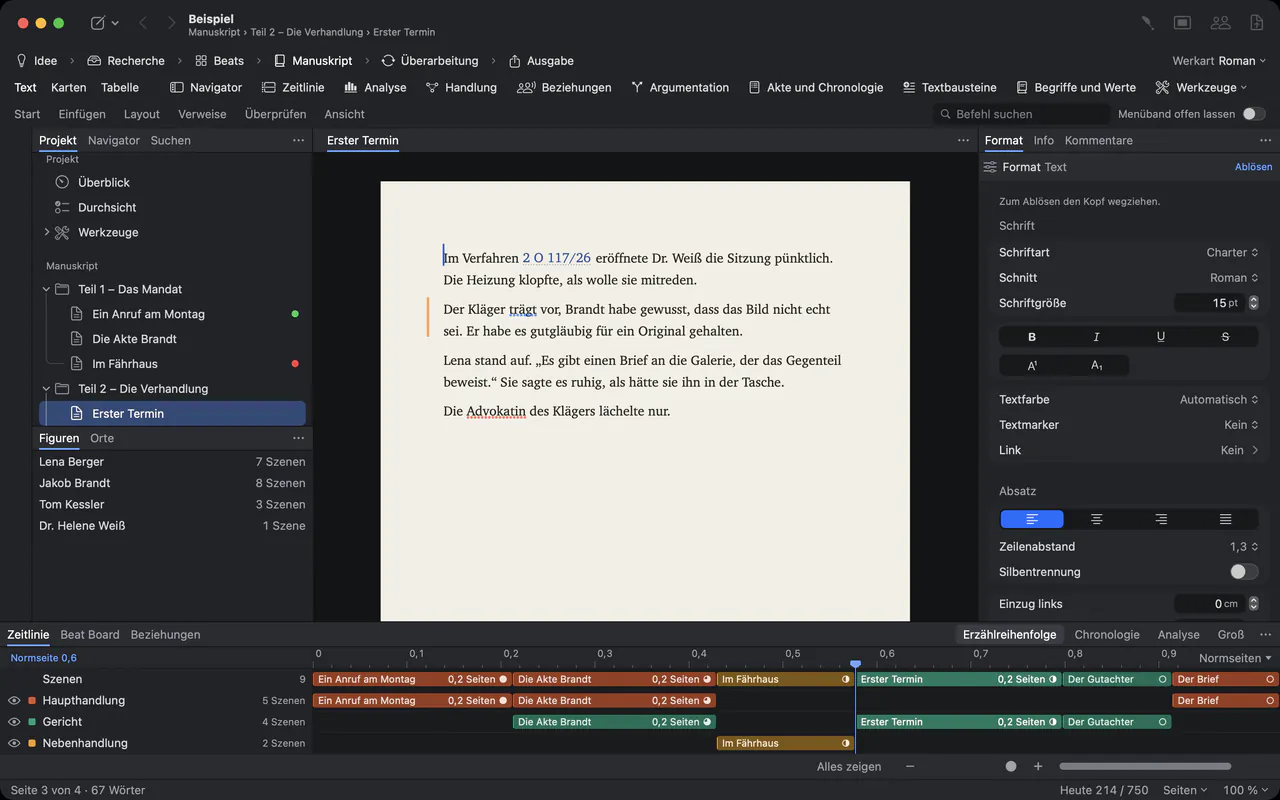
The outline on the left, the page in the middle, notes and details on the right. Light, dimmed or dark paper, zoom, keyboard control and VoiceOver are described in the accessibility chapter of the handbook.
The writing assistant, honestly. AI
- Off unless set up
- Goethe, the assistant, needs the Goethe Cloud subscription and an AI key from a provider. Without a key, Goethe Write stays completely offline.
- Always visible
- Suggestions arrive as tracked changes under the name “Goethe”. Nothing changes until someone accepts it.
- On the record
- Keep a Log (Settings ▸ Privacy) records every applied result with a checksum, never the wording. It is off by default.
- Locked texts
- Entry ▸ Hide from Goethe keeps texts and folders out of every request.
- The provider’s rules
- Text goes to the provider only on request, after permission once per provider, and the provider’s own terms apply. With Google Gemini’s free tier, inputs may be used to improve its services.
For the school as an organization.
- Teams through Apple Business ManagerGoethe Write for Teams costs US$29.99 per Mac seat, one-time, from five seats. It comes as a private app through Apple Business Manager; your administrator assigns and reassigns the seats, and nobody pays in the app.
- Apple School ManagerThe Teams offer runs through Apple Business Manager. We make no promise about Apple School Manager; if your school manages its Macs there, ask us before you plan.
- No usage dataThe app collects no usage data and sends nothing in the background. Projects are files where you save them.
- iPhone and iPadThe companion app is free. It writes plain texts and screenplays and opens projects from the Mac; texts with footnotes open there for reading only.
- Together in the roomGoethe Link connects devices on the same network, end-to-end encrypted. The Mac that shares needs Goethe Cloud; guests need no subscription.
Questions from schools and teachers.
Is Goethe Write a learning platform?
No. It has no classes, no grade book and no hand-in of assignments. It is a writing app. A teacher can save a project as a template with File ▸ Save as Project Template… for their own reuse, and pass a project on as a file.
May students use the assistant?
Whether, and from what age, students use an AI assistant is for your school to decide, together with the terms of the provider you choose. Goethe Write leaves the assistant off unless the subscription and a key are set up.
Do we need Apple School Manager?
Our Teams offer runs through Apple Business Manager and needs your organization’s Organization ID. We do not describe a route through Apple School Manager; write to us if your school uses it. A single teacher can buy the app for US$79.99 once, after 14 days free.
Which languages does the app speak?
Menus, windows and messages come in English and German; French and Spanish are planned. The language of the text itself is set per project.
Can younger students write on an iPad?
The iPhone and iPad app is free and writes plain texts with bold, italic and underline, as well as screenplays. Longer work with footnotes is written on the Mac.
A calm place to learn to write.
US$79.99 once for the Mac, with 14 days free; the iPhone and iPad app is free. For schools, US$29.99 per Mac seat from five seats. Goethe Cloud adds collaboration, read links and the assistant with your own AI key, for US$4.99 a month or US$49.99 a year.