For editors who want every change in one place.
Manuscripts arrive as Word files, edits travel by email, and by the third round nobody knows which version counts. Goethe Write keeps the text, every comment, every change and every earlier state in one project on your Mac.


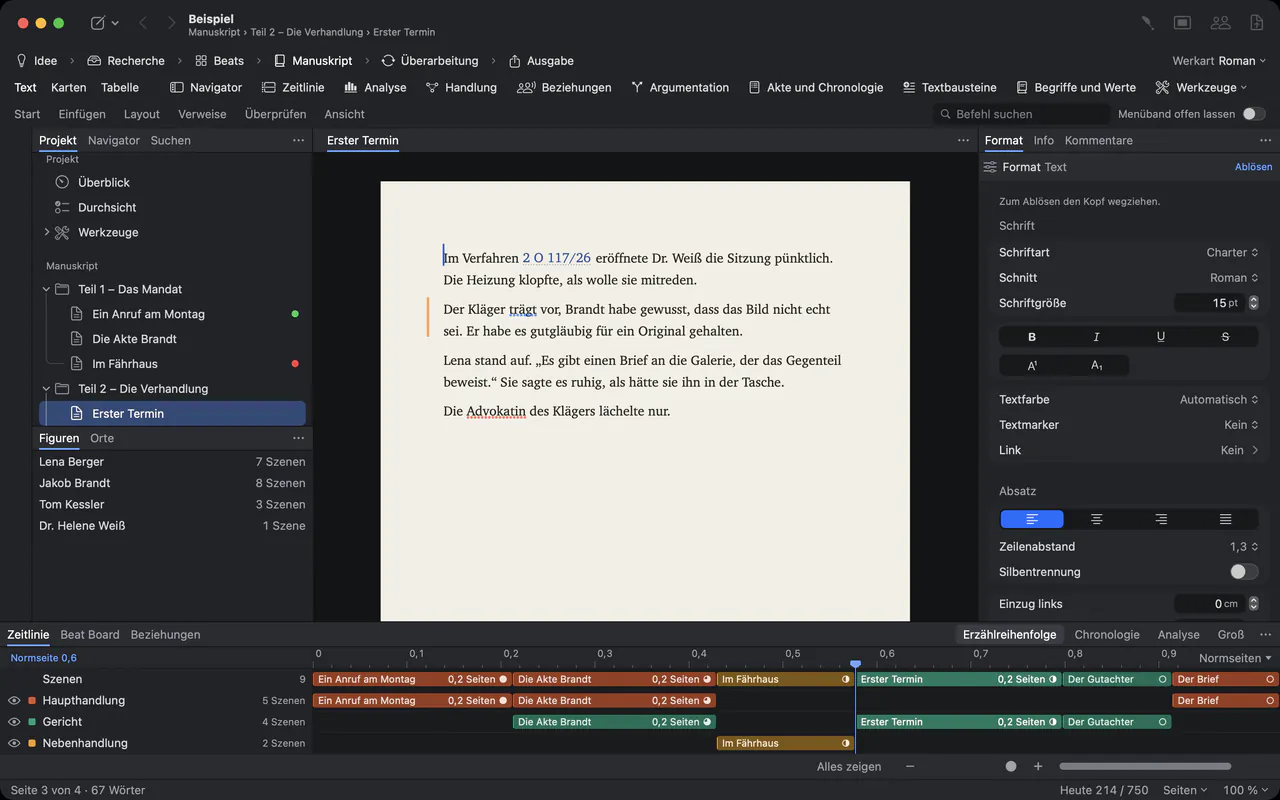
Editing is a conversation. Files are bad at conversations.
An editor reads, asks, cuts and suggests. The author answers, accepts some changes and fights for others. In a folder of Word files called “final”, “final 2” and “final author” this conversation falls apart: replies get lost, accepted changes come back, and nobody can say what the text looked like before the last round.
Goethe Write is a writing app for long texts. It was not built as a publishing system, but it was built for the editing round: a text, the remarks on it, the decisions about them and the states in between stay together, and authors who work in Word stay part of the conversation.
How an editing round works in Goethe Write.
Every command below is on the Review tab of the ribbon and in the Review menu. The handbook describes each one step by step.
- Bring the manuscript inFile ▸ Import ▸ Word File… turns a .docx into chapters and texts, with footnotes, pictures, and the comments and tracked changes already in the file.
- Comment like in the marginSelect a passage and choose Review ▸ Comment (⇧⌘K). Each comment is a conversation with replies, ticked off as resolved when it is settled.
- Track every changeReview ▸ Track Changes (⇧⌘E) records who inserts and deletes what, in that person’s color. The Show button filters by person, so you can accept one editor’s changes and leave another’s standing.
- One list of everything openGo ▸ Review opens the Review tool: comments, questions, tracked changes and notices of the whole project, with filters and a count of what is still open.
- Snapshots and comparisonReview ▸ Save Snapshot keeps a text as it is now. Review ▸ Compare… shows two states paragraph by paragraph, moved paragraphs included, and brings single paragraphs back.
- Rounds in colorIn novels and screenplays, Review ▸ Start Revision… gives a rewriting pass a name, a goal and a color, so you see later what came in during which round.
Your authors can stay in Word.
Not every author will switch apps for you, and they don’t have to. Review ▸ Send as Word… writes a .docx in which your comments arrive as Word comments with their replies and your tracked changes as Word insertions and deletions, with name and date.
When the author sends the file back, Review ▸ Apply Edits… reads it and first shows a summary of what would change. Nothing is overwritten: each text is saved as a snapshot, the author’s edits arrive as tracked changes in their name, and their comments as comments. You then accept or reject each change in Goethe Write. Applying the same file twice changes nothing the second time.
Word has things Goethe Write has no model for, such as formatting changes or endnotes. They are mapped onto what Goethe Write has, so Word serves as the exchange format, not as a second home for the manuscript.
See the structure, not only the sentences.
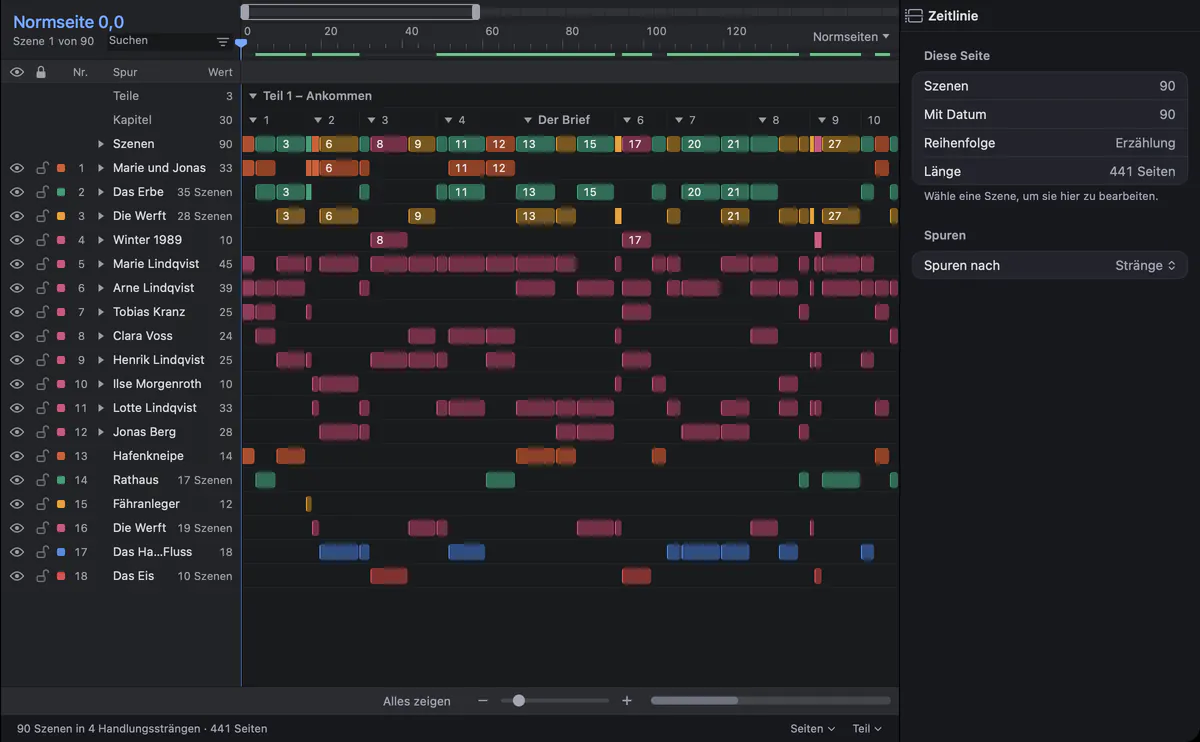
A structural edit needs the whole book in view. The timeline puts every scene on tracks for storylines, characters and places, so you see where a storyline pauses for a hundred pages or where a character is missing. The Review tool turns such findings into notices like “Character Absent Long”.
Hand on what the next person needs.
File ▸ Export… (⌥⇧⌘E) opens one dialog with a live preview and a check that lists what is still open, such as changes awaiting acceptance or open comments.
Standard manuscript and Normseite
For English-language projects the standard manuscript of English-language publishing; for German-language projects the Normseite with 30 lines of 60 characters.
Word
A .docx with headings, real footnotes, page numbers and, if you like, all comments and tracked changes.
E-book
EPUB 3 with a table of contents and footnotes as pop-up notes, for Apple Books, Kobo, Tolino and Send to Kindle.
Paperback proof
A PDF at 12 × 19 cm with justified text, running heads and chapters on new pages, to read the book as a book.
What Goethe Write does not do.
Goethe Write is not a production system. It does not manage schedules, rights or print runs, and it does not replace a typesetting program: PDF/X for printers is planned but not built yet.
Working together in one project needs Goethe Cloud on the Mac that shares it, in the same network or over the internet; read links open the manuscript in the browser. Authors who prefer to stay in Word work with you through the Word round trip.
Questions from editors.
Does the author need Goethe Write?
No. You can send the manuscript as a Word file with your comments and changes, and bring the author’s edited file back with Review ▸ Apply Edits…. An author who uses Goethe Write can also join your project as a guest on the same network, at no cost to them.
Can I see what the text looked like before my edit?
Yes. When you switch on tracking, Goethe Write first saves the snapshot “Before Track Changes”. Before every takeover from Word or from a comparison, the current text is saved as a snapshot too, and Review ▸ Compare… shows any two states side by side.
Does Goethe Write set the Normseite?
Yes. The output format Standard Manuscript sets the Normseite of 30 lines with 60 characters for German-language projects, and the standard manuscript of English-language publishing for English-language projects.
Can a writing assistant help with the edit? AI
If you subscribe to Goethe Cloud, Goethe, the writing assistant, can write Editorial Comments on a text, using your own key with an AI provider you choose. Its remarks arrive as comments in the name “Goethe”, and nothing enters the text unless you accept it.
What does it cost for an editorial team?
One Mac costs US$79.99 once, after 14 days free. Goethe Write for Teams costs US$29.99 per Mac seat, once, from five seats, through Apple Business Manager. Goethe Cloud costs US$4.99 a month or US$49.99 a year.
Keep the next editing round together.
Goethe Write is on the Mac App Store, with a free app for iPhone and iPad.