From the author’s manuscript to the submission.
An agency works on other people’s books: it reads them, sends notes back, shapes them with the author and finally sends them to publishers. Goethe Write helps with the text in each of those steps, on your Mac.


Many manuscripts, many files, little time.
Manuscripts reach an agency as Word files, PDFs and sometimes printouts. Editorial notes go back by email, the revised manuscript arrives weeks later, and the version you finally send to editors should carry the agency’s name and not leave your hands unmarked.
Goethe Write does not replace the agency’s systems for queries, contracts and royalties; it has none of those. It is the place where a manuscript you represent is read, discussed and prepared for submission.
Because the agency is often the first professional reader, the notes matter. In Goethe Write they stay attached to the passage they are about, they keep their replies, and when the author revises the text, a comment tells you that “the passage has changed since”.
What Goethe Write does for an agency.
- Open what the author sendsFile ▸ Import ▸ Word File… turns a .docx into chapters and texts with footnotes and the author’s comments. File ▸ Import ▸ Import Work… makes a new project from a PDF, text or RTF and suggests the people and places it found.
- Notes in the margin, not in an emailComment on a passage with Review ▸ Comment (⇧⌘K), ask open questions, and work through all of them in one list under Go ▸ Review.
- Back to the author as WordReview ▸ Send as Word… sends your notes and tracked changes as a Word file. Review ▸ Apply Edits… brings the author’s revision back as tracked changes in their name, after a snapshot of every text.
- What changed since the last draftReview ▸ Compare… shows the revised chapter next to the earlier snapshot, paragraph by paragraph, with the words that came in and fell out.
- A blurb and a proposal
 AIWith Goethe Cloud and your own AI key, Goethe can draft a Blurb and a Proposal for a book, or Summarize it. You read, change and decide; nothing enters the text on its own.
A submission that looks right and stays traceable.
File ▸ Export… sets the output format Standard Manuscript: for English-language books the standard manuscript of English-language publishing, with 12-point type, double spacing, one-inch margins and name, title and page number at the top right; for German-language books the Normseite of 30 lines with 60 characters. The check before export tells you if comments or tracked changes are still open.
An editor asked for the first three chapters only? Every entry has the switch Entry ▸ In Export. Leave the rest of the manuscript unticked, and the export holds only the sample chapters, while the full manuscript stays untouched in the project.
When a manuscript goes to several editors, set a watermark on the Design tab, group Page Design, button Watermark. File ▸ PDF per Recipient… then writes one PDF per name on your recipient list, each carrying its name in the watermark, for example “COPY FOR Ms. Winter”.
The whole manuscript in one window.
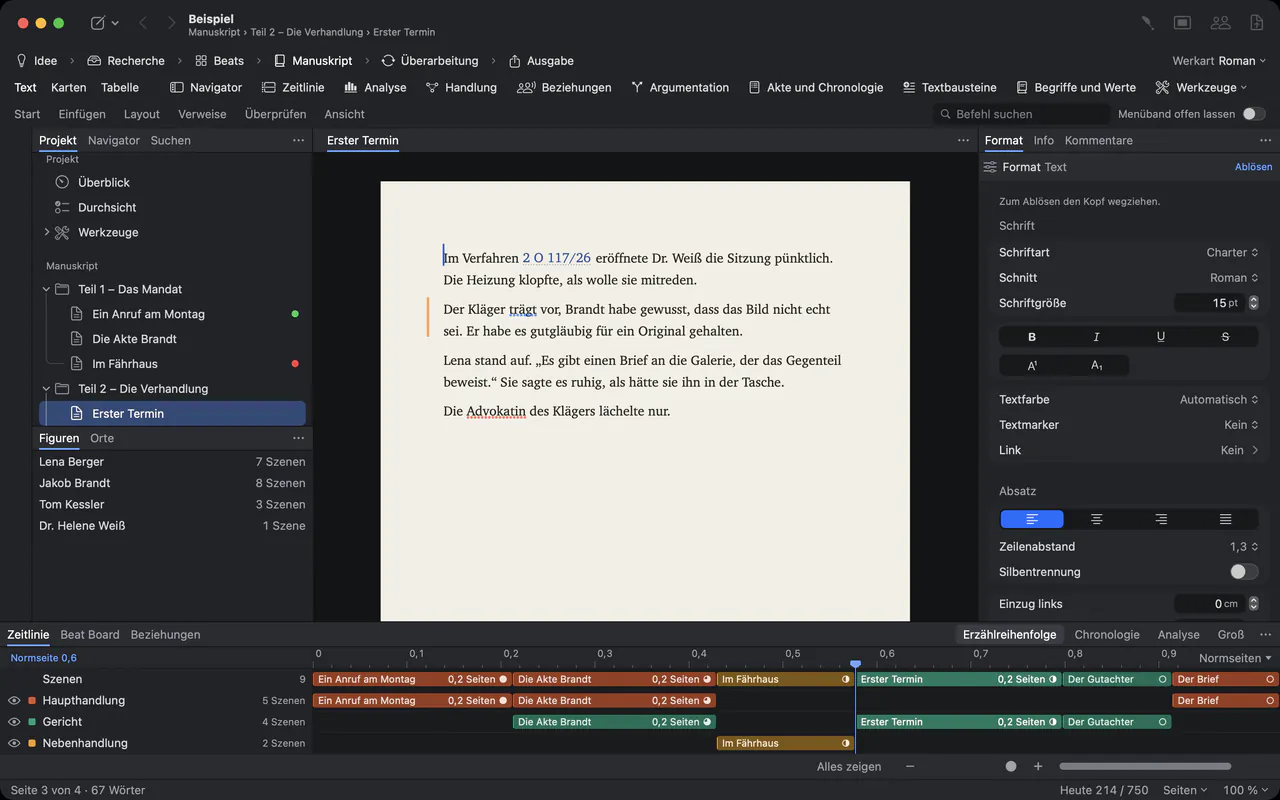
Parts, chapters and scenes in the sidebar, the page in the middle, and the details of whatever you select in the inspector. Status and labels show at a glance which chapters you have read and which still wait.
Unpublished work stays yours.
A manuscript you represent is not yours to leak. This is what the handbook promises about where it goes.
- Files on your Mac
- A project is a file on your Mac, backed up every 30 minutes while you work and whenever you close it.
- No Goethe server for the assistant
- Without a key, Goethe Write stays offline. With a key, Goethe talks directly to the provider you chose, and only when you ask.
- Hide from Goethe
- Entry ▸ Hide from Goethe keeps a text or folder away from the assistant entirely.
- Encrypted when shared
- Sharing on the same network is end-to-end encrypted. Guests you invite need no subscription.
Questions from agencies.
Do our authors have to use Goethe Write?
No. You exchange Word files with them: your notes go out with Review ▸ Send as Word…, their revision comes back with Review ▸ Apply Edits…. Authors who do use Goethe Write can join your project as guests on the same network for free.
Can we track submissions to publishers in Goethe Write?
No. Goethe Write has no list of queries, submissions, contracts or royalties. It is for the text itself.
Can editors at publishers read a manuscript in the browser?
Yes, with a read link from Goethe Cloud: the manuscript opens in any current browser, and editors can comment if you allow it. You can also send a PDF, for example one per recipient with a watermark.
Does the AI write the pitch for us?AI
Goethe can suggest a blurb or a proposal if you have Goethe Cloud and your own key with an AI provider. It is instructed not to invent events that are not in the manuscript, and you decide what is used.
What does it cost for an agency?
US$79.99 once per Mac after 14 days free, or Goethe Write for Teams at US$29.99 per Mac seat, once, from five seats through Apple Business Manager. Goethe Cloud costs US$4.99 a month or US$49.99 a year.
Prepare the next submission in Goethe Write.
On the Mac App Store. The iPhone and iPad app is free.