An AI book writing app that leaves the writing to you.
Goethe Write is a Mac app for writing books, with an AI assistant called Goethe built in. Goethe works with your own API key at Anthropic, OpenAI, Google, Mistral or OpenRouter, or with a model on your own Mac. It revises, shortens, checks and answers questions about your manuscript. It does not write the book for you, and every change it suggests arrives as a tracked change you accept or reject.


What kind of AI book writing app this is. AI
There are two ideas of an AI book writing app. In the first, the AI writes and you tidy up. In the second, you write and the AI is a second pair of eyes you call when you want one. Goethe Write is built on the second idea. If you are looking for a tool that turns a prompt into a finished novel, this is not it – and we would rather say so here than after you have installed it.
What Goethe does well is the work around your own sentences: shortening a chapter that runs a third too long, finding the scene that contradicts chapter 2, suggesting five titles, drafting a blurb from the book you actually wrote. It can continue a passage in your voice for about 120 to 250 words, or sketch what the next scene might be. You decide what stays.
Goethe is part of the Goethe Cloud subscription and works with a key from the provider you choose; the provider bills its use directly to you. Without a key, Goethe Write stays completely offline, and everything else in the app works the same.
What the assistant does for a book.
Select a passage, right-click and choose Goethe… – or use Edit ▸ Ask Goethe… (⌃⌘G), or the quill in the toolbar. A small window opens beside your text. At the top is the free field What Should Goethe Do?; below it the jobs that fit what you selected, in four groups.
- ReviseImprove, Shorten (by about a third), Expand without inventing new events, Rephrase in a factual, literary or simpler tone, Correct spelling and grammar only, and Show, Don’t Tell for narrative passages.
- CheckCheck Scene looks for what does not fit the characters, places, timeline and earlier scenes and leaves comments there. Editorial Comments reads like an editor. Find Contradictions works across a folder or the whole manuscript.
- CreateContinue Writing, Write Synopsis, Suggest Titles and Sketch Next Scene. For a folder or the whole book there are also Blurb and Proposal.
- QuestionsExplain, Summarize, or anything you type into the field: “Why does Lena hesitate here?” A question gets an answer as a comment or to copy; a request like “a bit shorter” changes the passage.
The book stays yours, on real pages.
The assistant lives inside a full writing app. You write on pages that look like the finished book, plan with an outline, cards and a timeline, and keep characters and places in the same project. Suggestions from Goethe appear in the same review tools you use for an editor’s changes, under the name “Goethe”, so you can always see what came from it.


The ribbon’s Review tab: spelling, comments, track changes and snapshots
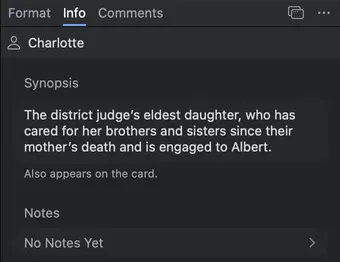
Charlotte’s profile in the Inspector: synopsis and notes
Nothing lands in your text on its own.
Most worries about AI in a manuscript are about control: a sentence quietly rewritten, a date changed in paragraph four, a voice that slowly stops being yours. Goethe Write answers them with the same tools an editor’s changes go through.
- Changes by Goethe, word by wordReplace puts a suggestion into your text as a change by Goethe. A correction shows as one changed word, not a new paragraph. You accept or reject it like any tracked change, and ⌘Z takes back the whole result at once.
- Differences before you decideThe button Differences shows what Goethe would change compared with your text. Lists of suggestions come with checkmarks: uncheck what you don’t want, then Apply – in one step, undone in one step.
- A check without any modelBefore you apply anything, the app itself compares numbers, dates, quotations, the names of your characters and places, negations and words like “only”. What differs stands above the buttons – for example Changed: 1832 → 1823 – and the button reads Replace Anyway.
- A snapshot before acceptingAccepting cannot be undone, so Goethe Write first saves a snapshot of every affected text. You find it under Inspector ▸ Snapshots.
- Told not to inventGoethe is instructed not to invent plot events, names, dates, quotations or citations that are not in your material, and to mark a guess as “[Guess: …]”. It can still be wrong; the responsibility for the text stays with you.
One small window beside the passage.

Your own API key, set up once.
Goethe Write has no AI server of its own. You bring a key, and Goethe talks to that provider directly. You choose the model, you pay the provider without a markup, and you can change providers whenever you like. With Custom Server – Ollama, LM Studio or vLLM on your Mac – no text leaves the Mac at all.
- 1. Open the settingsChoose Goethe Write ▸ Settings… and open the page Goethe.
- 2. Choose the providerUnder Provider, click Anthropic Claude, OpenAI, Google Gemini, Mistral, OpenRouter or Custom Server. Create Key at … opens the right page at the provider.
- 3. Paste and check the keyPaste the key into API Key, click Save, then Check. “Valid · 5 models” means it worked. The key lives only in your Mac’s keychain; afterwards only its last four characters are shown.
- 4. Model and thoroughnessChoose the Model – the recommended ones come first – and the Thoroughness: Fast, Balanced or Thorough. Thorough thinks longer and costs more.
- 5. Turn it onSwitch on Use Goethe at the top. The first time you ask, Goethe asks once per provider for permission to send text, and says exactly what will go.
Google’s free tier may use inputs to improve its services; for confidential manuscripts, the handbook recommends a paid account.
Exactly what is sent – and what never is.
An unpublished book is worth protecting. Text goes out only when you ask Goethe for something, straight from your Mac to the provider you chose – no detour through a Goethe Write server, no cookies, no cache.
- Sent
- Goethe’s instructions with your house rules, the passage or text you chose under Goethe Reads, any sources you included, and your request.
- Only if you want
- Brief project details – title, synopsis, characters and places, one line each – go along only while Send Project Details is on.
- Never sent
- Anything locked with Entry ▸ Hide from Goethe: a hidden text or folder is never read, not as material, not as a source, not in the project details. Nor is your project file as a whole.
- Your key
- Only in your Mac’s keychain, only to the provider you saved it for. Goethe Write sees neither your key nor your texts.
- Cost
- The provider bills by tokens. Settings ▸ Goethe ▸ Cost shows this month’s requests and an estimate; the provider’s invoice applies. Your own server costs nothing in Goethe.
Compared with an AI-first writing app.AI
Novelcrafter is a well-known browser app for novelists that also works with your own AI key. Here are the published facts side by side.
| Goethe Write | Novelcrafter | |
|---|---|---|
| Availability | On the Mac App Store | Available now |
| Systems | Mac (macOS 15 or later); free app for iPhone and iPad (iOS and iPadOS 26 or later) | In the browser, nothing to install; usable on phones |
| Pricing model | One-time purchase of US$79.99 on the Mac, 14 days free; Goethe Cloud US$4.99 a month or US$49.99 a year | Subscription: Scribe US$4, Hobbyist US$8, Artisan US$14, Specialist US$20 a month; a 21-day trial |
| AI assistantAI | Optional: Goethe, with your own key at Anthropic, OpenAI, Google, Mistral, OpenRouter or your own server; part of Goethe Cloud | AI with your own key or local models (OpenRouter, OpenAI, Anthropic, Google, Mistral, LM Studio, Ollama), from the Hobbyist plan |
| Files | Exports PDF, Word, EPUB, Markdown, RTF, Final Draft and Fountain | Exports Word and Markdown; no formatting for publication |
| Offline | Writing, saving, importing and exporting need no internet and no account | Needs an internet connection for now |
Sources: Novelcrafter: pricing, Novelcrafter: features, Novelcrafter: exporting a novel, Novelcrafter: offline mode.
Checked 13 Nov 2026 on novelcrafter.com. Novelcrafter is a trademark of its owner; Goethe Write is not affiliated with it.
Where the other approach is ahead.
If you want AI woven deeply into drafting, an AI-first app goes further than Goethe today: Novelcrafter, for example, summarises scenes, extracts characters into its story bible and runs in any browser.
Goethe Write is for writers who want to write offline in a native Mac app, see real pages, export a finished PDF or EPUB – and use AI only when they ask, or not at all. Goethe operating the app itself, Shortcuts and Siri are planned but not built yet; today it writes, checks and presents lists.
Plan the book, then ask for help where it matters.
The assistant works best on a book you can see whole. Goethe Write leads a project through stages – Idea, Research, Beats, Manuscript, Revision, Output – with cards and an outline table.

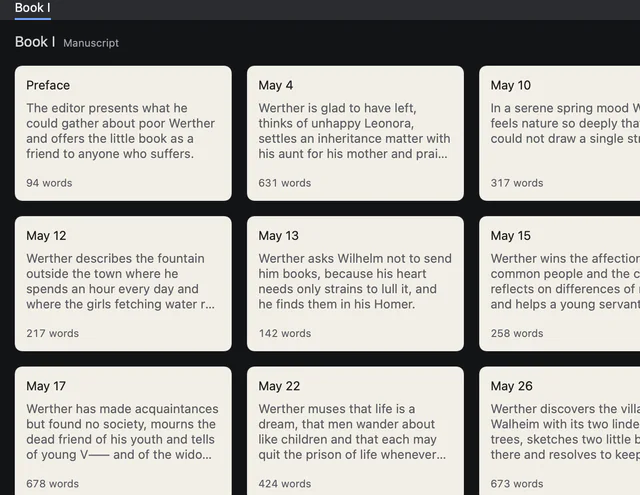
Index cards of the letters, each with title, synopsis and word count
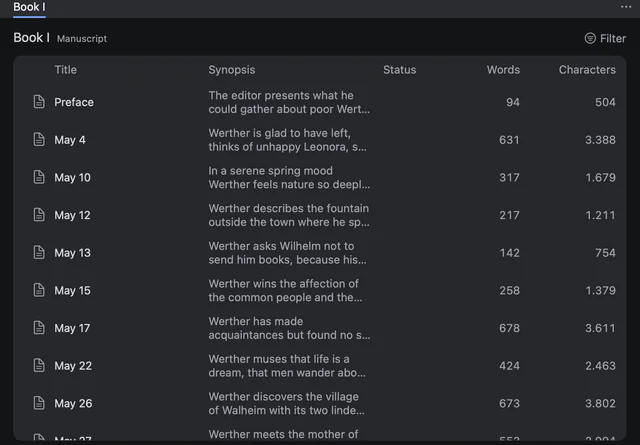
The outline table with synopsis, status and word count per letter
Questions about writing a book with AI.AI
Will Goethe write my book for me?
No. Goethe revises, shortens, checks, answers questions and can continue a passage for about 120 to 250 words or sketch a next scene. It is built for writers who stay the author: every suggestion arrives as a change, a comment or a note that you apply yourself.
Do I need my own API key?
Yes. Goethe works with your own key at Anthropic, OpenAI, Google, Mistral or OpenRouter, or with your own server such as Ollama or LM Studio, which may need no key at all. Goethe Write has no AI server of its own.
What does the AI cost?AI
Goethe is part of Goethe Cloud, at US$4.99 a month or US$49.99 a year. The answers are billed by your provider, directly to you, by the tokens used; Goethe Write adds nothing on top and shows an estimate under Settings ▸ Goethe ▸ Cost. Your own server costs nothing.
Is my manuscript used to train AI?AI
That depends on the provider you choose, and their privacy terms apply; Goethe links to them before the first request. Goethe Write itself sees neither your texts nor your key. For confidential texts, the handbook advises against Google’s free tier, and with your own server on the Mac no text leaves it.
Can I keep some chapters away from the AI?AI
Yes. Select a text or folder and choose Entry ▸ Hide from Goethe. Goethe never reads it, not even as background. Entry ▸ Unhide releases it again.
Can I use Goethe Write without any AI?AI
Yes. Without a key, Goethe Write stays completely offline. Writing, planning, typesetting and export work without an account, without the internet and without the assistant.
Write it yourself. Ask when you want a second opinion.
Goethe Write is US$79.99 once for the Mac, with 14 days free. Goethe Cloud – collaboration over the internet, read links and the Goethe assistant on your own AI key – is US$4.99 a month or US$49.99 a year. The iPhone and iPad app is free; for teams, US$29.99 per Mac seat from five seats.
Pricing and free trialRead the Goethe chapterGoethe Write for Teams