Write a book on your Mac – from the first idea to the finished e-book.
To write a book on a Mac you need four things: somewhere to plan, pages to write on, a way to keep going and a clean file at the end. Goethe Write is book writing software for the Mac that keeps all four in one project – for a novel, a non-fiction book, a memoir or a guide – and exports the manuscript, a paperback layout and an EPUB e-book.


What book writing software should do for you.
A word processor treats a book as one long document. Book writing software treats it as what it is: chapters written out of order, sources beside them, a target for the whole, and the files the book has to become – a manuscript for an agent, a Word file for an editor, an e-book for readers.
When you compare apps, these questions are worth asking. Which matter most depends on your book.
- StructureCan you move a chapter by dragging it, and see the whole book as an outline?
- PagesDo you see the book as it will look, or only a column of text until the very end?
- Your kind of bookDoes it suit non-fiction and memoir as well as fiction?
- OutputWhich files come out: standard manuscript, Word, EPUB, a print layout?
- OwnershipIs the book a file you own, and can you write without an account or the internet?
- PriceOne purchase or a subscription – and what does it cost over the years a book can take?
Any kind of book, not only novels.
Goethe Write knows four types of work: Novel, Nonfiction Book, Law and Screenplay. The type decides the phases in the head of the window and which tools appear. It changes nothing in your text, and you can switch it at any time under Project ▸ Type of Work.
- NovelThe Novel template brings three parts with five chapters and guiding questions, sheets for main character, antagonist and setting, and the tools for fiction: Beat Board, timeline, characters and places. Everything for fiction is on the page about novel writing software.
- Non-fiction and guidesThe Nonfiction Book template brings an introduction, three chapters, a conclusion and a text for your sources. Its third phase is called Outline and shows the manuscript as a table with status, words and synopsis. Switch on the Academic tools under Project ▸ Tools… and you get literature, Cite, cross-references and a bibliography. More on non-fiction writing software.
- MemoirA memoir is true, but it is told in scenes. Start it as a nonfiction book, or as a novel if you want the timeline and sheets for the people in your life – you can switch later without losing anything. Old diaries as PDF, RTF or text come in with File ▸ Import ▸ Import Work…, split into parts and chapters. The writing side is in our article from journal to memoir.
- Letters, poems, travel writingThe sample projects – Werther as letters, poems set on pages, the Italian Journey as a travel diary on a timeline – are Goethe’s own works. More of them in the Goethe world.
From idea to output, in steps you can see.
The head of the window shows the phases of your book: for a novel Idea · Research · Beats · Manuscript · Revision · Output, for a non-fiction book Outline instead of Beats. A click shows the phase and changes nothing in the project, so you always see where the book stands.


The stage bar: Idea, Research, Beats, Manuscript, Revision, Output
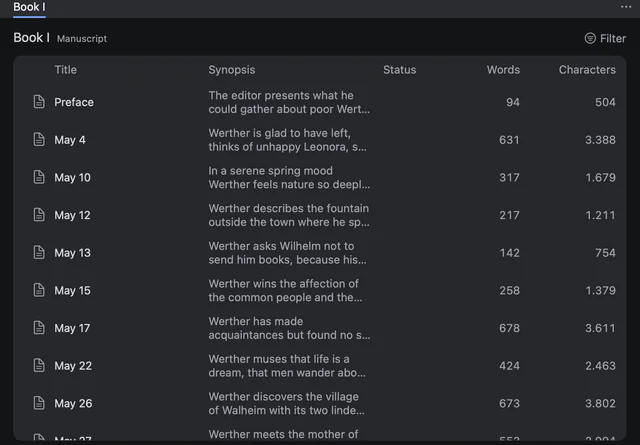
The outline table with synopsis, status and word count per letter
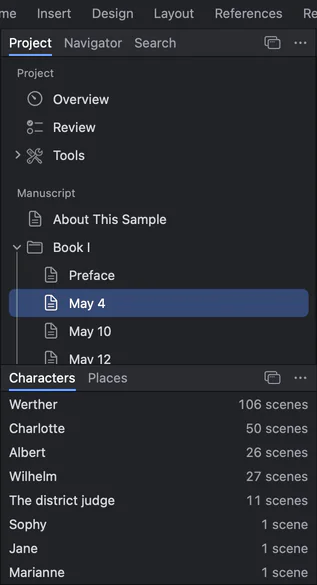
The project sidebar: overview, books with their letters, and the characters with the number of scenes they appear in
Writing a book in Goethe Write, step by step.
Each step is in the handbook with its exact menu path. Take them in any order.
- 1. Start the projectFile ▸ New Project… (⌘N), then Novel, Nonfiction Book or Empty Project. A project is a single file on your Mac that holds the texts, the outline, characters, research and snapshots.
- 2. Say what the book isIn the Idea phase of a non-fiction book you answer The Work in One Sentence and Key Message and Benefit: which question the book answers, and for whom.
- 3. Build the structureEvery chapter or scene is a text of its own in the sidebar, grouped in folders. Drag to reorder, or see them as cards (⌘2) or as a table.
- 4. Bring in the researchFile ▸ Add Files to Research… puts PDFs, images and documents next to the manuscript, one click away while you write.
- 5. Write on pagesIn the View tab choose Pages, then Two Pages to see the left and right page together. When you need quiet, View ▸ Focus (⇧⌘↩) leaves only the page.
- 6. Keep goingProject ▸ Targets…: a scope such as 80,000 words, a deadline and your writing days. Goethe Write works out the daily target and shows the day’s progress quietly in the status bar.
- 7. Revise without fearReview ▸ Save Snapshot keeps a text as it is now. Review ▸ Compare… sets two states side by side, and you can take back single paragraphs.
- 8. FinishFile ▸ Export… (⌥⇧⌘E): Standard Manuscript for agents and publishers, Paperback for print, E-Book for readers, Word for your editor – with a live preview and a check of what would still go wrong.
One book, every file it has to become.
The export sets the same text for different readers without touching your project. Switch from Standard Manuscript to Paperback and the whole page changes, while your text stays as it is. The same afternoon can give you the manuscript for the agency and the layout for a reading.
Today Goethe Write exports PDF, Word (DOCX), EPUB, Markdown and Rich Text. The e-book has a table of contents and footnotes and is made for Apple Books, Kobo and other readers. Details in import and export and in the handbook chapter on export.

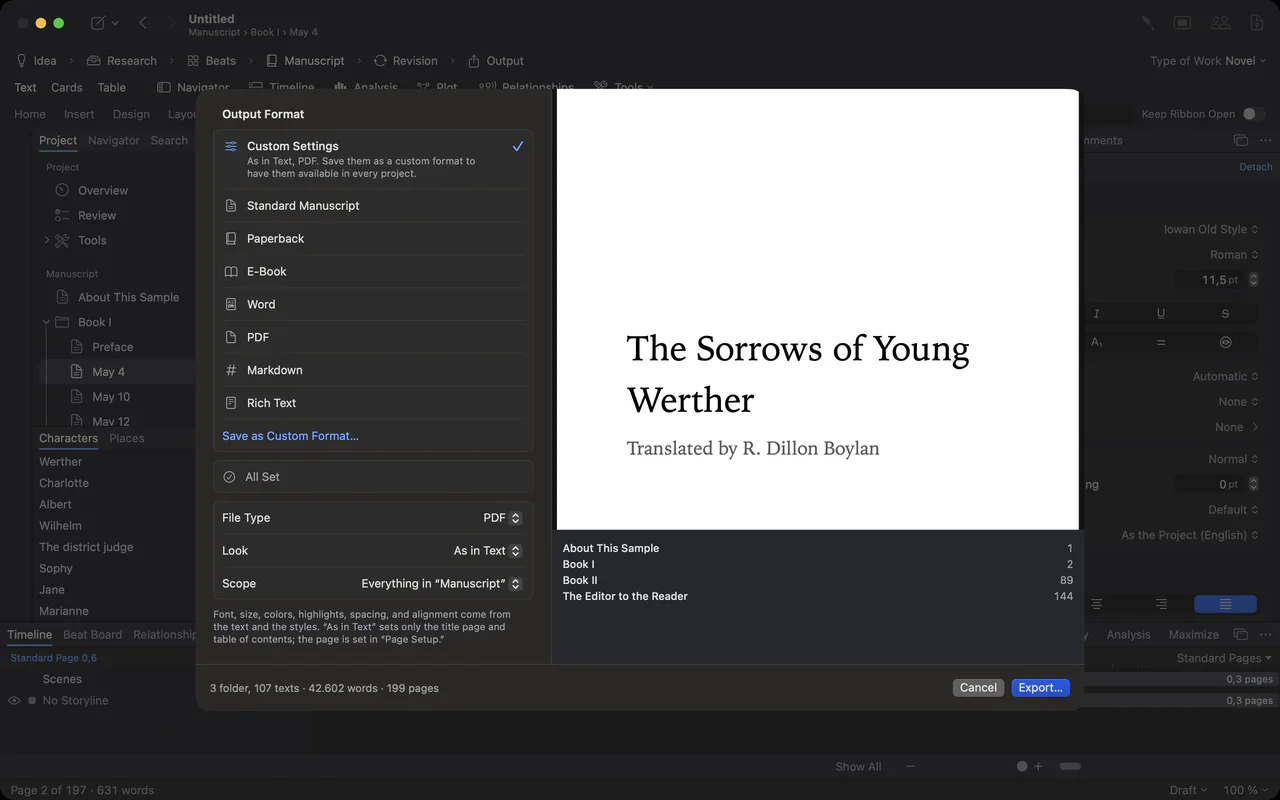
The export sheet: output formats on the left, the title page as a live preview on the right
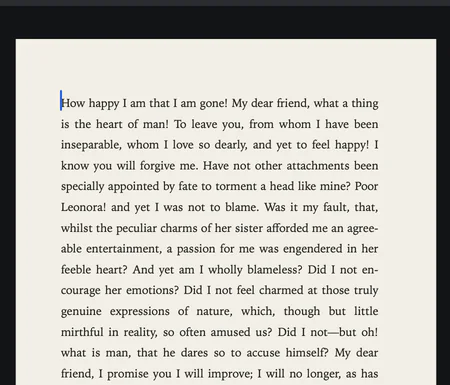
Close-up of a typeset manuscript page in a book face, justified
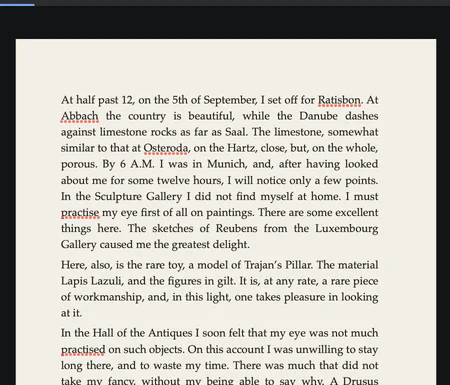
An entry of the Italian Journey, Munich, 6 September 1786, on its page
Try it with your own chapters.
14 days free on the Mac. Bring a Word file or a Scrivener project and see your book on pages.
How other ways of writing a book compare.
Many books are written in a word processor, and many good ones. Here is what the makers publish about the tools people most often weigh against each other – including where they are ahead.
| Price model | Where it is strong | Worth knowing | |
|---|---|---|---|
| Goethe Write | US$79.99 once on the Mac, 14 days free; Goethe Cloud US$4.99 a month or US$49.99 a year for working together | Planning, writing on real pages and export in one project; standard manuscript, Normseite, paperback and EPUB | On the Mac App Store; books are written on the Mac |
| Microsoft Word | Microsoft 365 Personal US$99.99 a year or US$9.99 a month; Office Home 2024 US$179.99 once; Word for the web free | Windows, Mac, iPhone, iPad, Android and the web; real-time co-authoring with Microsoft 365 | Co-authoring not in Office 2024 |
| Apple Pages | Free on Apple devices; an optional in-app subscription adds premium templates | Book templates for EPUB books, publishing straight to Apple Books, real-time collaboration through iCloud | Exports EPUB, Word, RTF, plain text and PDF |
| Scrivener 3 | A separate licence for each system; a discounted bundle for Mac and Windows | Mac, Windows, iPhone and iPad; compiles to Word, RTF, PDF, EPUB, Kindle and more | You write in an editor and compile the finished document; sync through Dropbox |
| Vellum | Vellum Ebooks US$199.99, Vellum Press US$249.99, once | 24 trim sizes plus large print, book styles with drop caps, validated EPUB and print PDF (PDF/X-1a) | A book formatter: it lays out a finished manuscript rather than drafting one; Mac only |
| Atticus | US$147 once, updates included | 17 formatting templates and a theme builder; a web app for Windows, Mac, Linux and tablets | Imports Word (.docx); exports EPUB, PDF and Word |
Sources: Microsoft 365: compare all plans, Pages in the App Store, Scrivener overview, Vellum: home, Atticus: home.
Checked 13 November 2026 on the makers’ websites (Scrivener: 12 November 2026). All names are trademarks of their owners; Goethe Write is not affiliated with them.
Where the others are ahead – and where Goethe Write is different.
If your book is finished and you only need a beautiful print interior, Vellum or Atticus offer more trim sizes and design templates than the Paperback and E-Book formats of Goethe Write, and Vellum writes PDF/X-1a. If you also write on Windows, Word, Scrivener and Atticus run there; Goethe Write runs on the Mac.
In Goethe Write the plan, the research, the pages and the output stay in one project, you buy the app once, and writing, saving, importing and exporting need no internet and no account. Detailed comparisons: Scrivener, Word, Pages, Vellum, Atticus.
What to know before you start.
Goethe Write is available now on the Mac App Store. Books are written on the Mac (macOS 15 or later). The free iPhone and iPad app is a companion: it writes screenplays in Final Draft and Fountain format, opens projects from your Mac and joins shared projects.
Some formats are planned but not built yet, among them OpenDocument, plain text, PDF/A and PDF/X. Sync between your devices through Goethe Cloud is coming too. No date is promised.
What it costs.
The App Store shows the price in your currency before you buy.
- Goethe Write for Mac
- US$79.99, paid once in the app, with 14 days free on the Mac.
- Goethe Cloud
- US$4.99 a month or US$49.99 a year: writing together in the same network and over the internet, read links with comments for your first readers, and Goethe, the writing assistant, with your own AI key. Guests you invite pay nothing.
- iPhone and iPad
- Free.
- Teams
- US$29.99 per Mac seat, paid once, from five seats – for publishers, agencies and schools. See Goethe Write for Teams.
Questions about writing a book on a Mac.
What is the best software to write a book on a Mac?
That depends on your book and how you work. Look for structure you can rearrange, real pages, tools for your kind of book, the files you need at the end and a fair price. Goethe Write covers these in one app; the comparison above shows where others are stronger. Try it 14 days free and judge with your own chapters.
Can I write non-fiction or a memoir, or only novels?
Both. The Nonfiction Book type has its own phases and an outline table, and the Academic tools add citations and a bibliography. A memoir can start as either type and switch later under Project ▸ Type of Work.
Can I bring a book I started in Word or Scrivener?
Yes. File ▸ Import ▸ Word File… brings in headings as folders and texts, footnotes, comments and tracked changes. File ▸ Import ▸ Scrivener Project… brings the binder, synopses, notes, labels and status. A finished work as PDF, text or RTF can be split into chapters with Import Work….
Can I make an e-book and a paperback?
Yes. The E-Book format writes an EPUB for Apple Books, Kobo and other readers, with a table of contents and footnotes. The Paperback format sets 12 × 19 cm pages with running heads, and Page Setup offers more book sizes, 6 × 9 inches among them. Dedicated formatters offer more design templates.
Do I need a subscription to write a book?
No. Goethe Write for Mac is a one-time purchase of US$79.99, with 14 days free. Goethe Cloud is only needed for writing together, read links and Goethe, the assistant.
Is my book stored in the cloud?
No. The project is a file on your Mac, in an open format. Goethe Write saves as you write and makes backups when you close and every 30 minutes.
Start the book you keep thinking about.
Try Goethe Write 14 days free on the Mac, then keep it for US$79.99 once. Writing needs no account.