Concepts, scripts and copy that clients sign off.
Goethe Write is a Mac app for copywriters and for creative and content agencies who write more than a headline: concepts, campaign rationales, scripts for spots, long copy and white papers. One project per client keeps the brief, the drafts and the approved wording together.


Where agency copy gets lost.
A campaign lives in too many places: the brief in an email, the concept in a slide file, the script in a shared document with forty comments, the approved claim in somebody’s memory. Then the client asks for the version from Tuesday, and nobody is sure which one that was.
Goethe Write keeps a client’s work in one project – the brief and the material in Research, every deliverable as a text in the outline – and remembers every state you saved.
One project per client.
Status for your process
Entry ▸ Status marks each text from Idea to Done. Under Project ▸ Custom Details… add steps of your own, such as “With the client”.
Labels by channel
Entry ▸ Label gives a text one of seven colors. Name them under Project ▸ Custom Details… – red for TV, blue for web.
Collections
Entry ▸ New Collection… keeps a saved search, such as everything still with the client, and updates itself as the texts change.
Templates
A structure you use for every pitch? Choose File ▸ Save as Project Template…, and new projects start that way.
Wording that stays approved.
Switch on the Consulting tools under Project ▸ Tools…. They bring two things agencies need all the time: values and a clause library.
- Change once, changed everywhereUnder Terms and Values, keep the product name, the price or the campaign date as a value and put it into the text with Insert ▸ Field. Change the value once, and every place changes, in the export too.
- Clause LibraryClaims, disclaimers and boilerplate with placeholders, variants for different markets, approval with name and date, and versions. Insert ▸ Clause puts the approved wording in, and the library tells you where an older version still stands.
- ApproveReview ▸ Approve… first lists what is still open, such as changes and comments, then saves a snapshot named “Approved by (your name)” with the date.
- TermsDefine a term once, and Goethe Write finds it in every text, with the other forms you name. If the definition changes, it shows you every place to check.
Brief, draft and approval in one window.
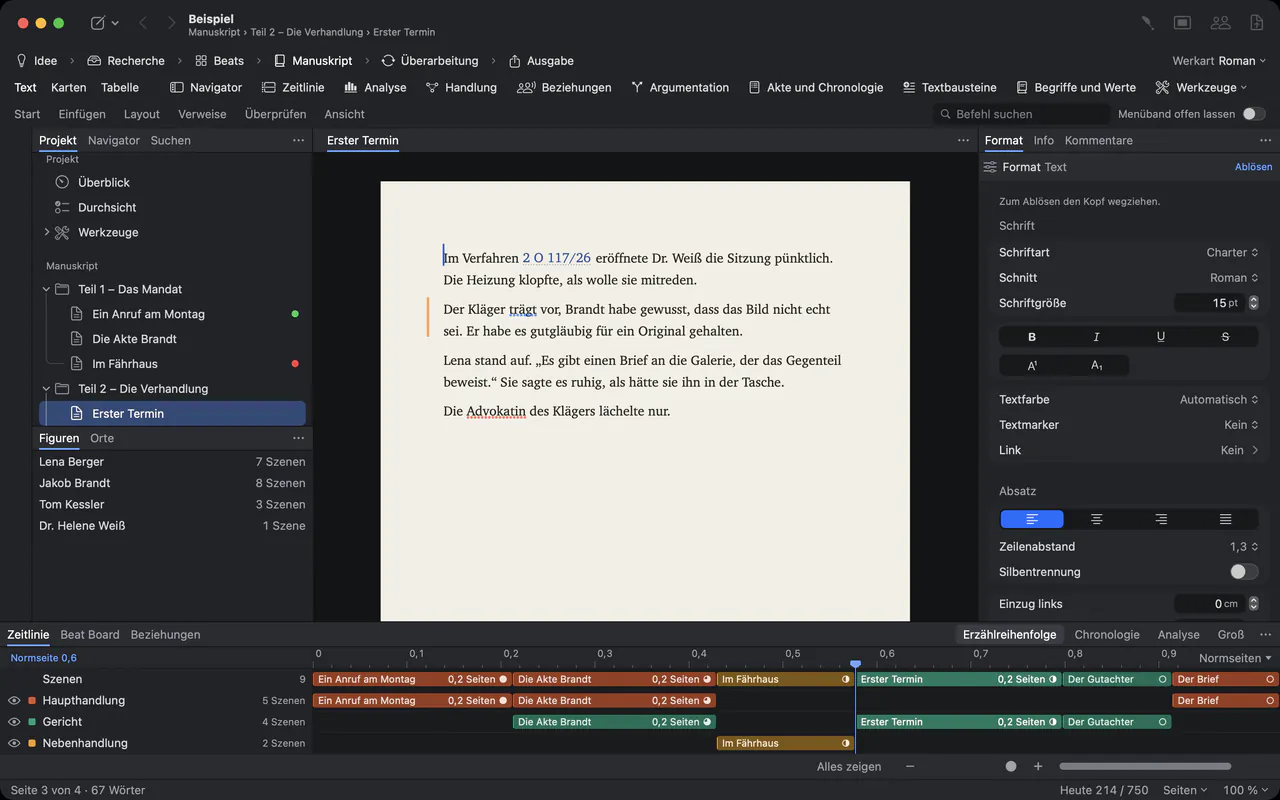
Brand guidelines, the client’s brief and last year’s campaign go into Research with File ▸ Add Files to Research…. View ▸ Second Pane (⌥⌘↩) opens them next to the copy you are writing, and the Inspector shows status, label and target of the text in front of you.
Scripts for spots.
For TV, cinema and video spots, start a project with Project ▸ Type of Work ▸ Screenplay: scene headings, action and dialogue in industry format as you type, and Final Draft, Fountain or PDF on the way out. With Goethe Link, several writers can work in the same scene at once, paragraph by paragraph.
Goethe Write has no two-column AV script format and no storyboard. Radio scripts and other spoken copy you write as ordinary text – and Edit ▸ Speech ▸ Start Speaking reads them aloud, so you hear the rhythm before the studio does.
Clients read in the browser.
Read links
With Goethe Cloud, the Collaborators window creates a read link. The client opens it in any browser, on any computer, selects a passage and comments; the comment arrives in your project under their name. The reading page shows the text, not the pictures.
Word, PDF and watermarks
If the client edits in Word, Review ▸ Send as Word… and Review ▸ Apply Edits… bring their changes back as tracked changes. For pitch documents, File ▸ PDF per Recipient… writes one PDF per name, with the name in the watermark.
Goethe learns the house style.
Goethe, the writing assistant, works with your own AI key. Under Project ▸ House Rules for Goethe… write the client’s rules – spellings, words to avoid, the tone. Then ask for Suggest Titles (five at a time), Shorten, Rephrase in a Factual or Simpler tone, or Translate. Every suggestion arrives as a tracked change that you accept or reject.
Confidential client material stays out with Entry ▸ Hide from Goethe. Goethe is part of Goethe Cloud, and without a key the app stays offline.
Questions from agencies.
Does Goethe Write count characters for ads and posts?
Review ▸ Word Count … shows characters with and without spaces for any selection, as well as words. There are no presets for particular ad platforms; you compare with their limits yourself.
Can we track time or bill clients with it?
No. Goethe Write is a writing app, not a tool for project management, time tracking or invoicing. It keeps texts, versions and approvals; billing stays in the tools you already use.
Can clients without Goethe Write review our work?
Yes. A read link opens the work in any current browser, and readers can comment if you allow it. Clients who prefer Word get a .docx with comments and changes, and their edits come back as tracked changes.
Does it lay out ads?
No. It writes and sets text – pages, styles, PDF, Word, EPUB – but it is not a design or layout program. Hand the approved copy to your designers as Word, Rich Text or Markdown.
Can the whole agency use it?
Goethe Write for Teams costs US$29.99 per Mac seat, one-time, from 5 seats, bought through Apple Business Manager. Sharing projects and read links need Goethe Cloud; the guests you invite work without a subscription of their own.
Bring the next campaign into one project.
14 days free on the Mac, then US$79.99 once. Goethe Cloud – US$4.99 a month or US$49.99 a year – adds read links, working together and Goethe. Agencies: US$29.99 per Mac seat, from 5 seats.