The best screenwriting software for Mac: what to look for before you buy
There is no single best screenwriting software for Mac – there is the one that fits the way you write. Check seven things: industry format, Final Draft and Fountain files, the price model, writing with others, iPhone and iPad, planning tools, and what happens to your scripts if you stop paying. This guide explains each one, sets the main Mac options side by side with their makers’ own facts, and shows honestly where Goethe Write fits and where others are ahead.


Seven things to check before you buy.
Feature lists look alike. These questions show which program will carry a script from first draft to production.
- 1. Industry format as you typeScene headings, action, characters, dialogue and transitions in the right indents, with Tab and Return moving between them. Page breaks with (MORE) and (CONT’D) decide whether one page still means about one minute.
- 2. Final Draft and Fountain filesProducers, schools and competitions still exchange .fdx files. Fountain is plain text that every tool can read. A program that opens and saves both keeps you free to move.
- 3. The price modelA one-time purchase, a subscription, or a free plan with limits. Count what you will pay over three or five years, not for one month.
- 4. Writing with othersCan a writing partner work in the same scene? Does every collaborator need a paid licence of their own? Can a producer read without installing anything?
- 5. iPhone and iPadIs there a mobile app, does it cost extra, and does it write real screenplay format or only show it?
- 6. Planning before the pagesBeats, cards, an outline and a timeline in the same project save you from copying a whiteboard photo into a document later.
- 7. Your scripts if you stop payingCan you still open, print and export your work? Are the files in an open format on your own disk?
Industry format: the part you should never have to think about.
Goethe Write sets a screenplay by the rules Final Draft 13 applies: Courier 12 point, fixed indents, 54 lines on a US Letter page (58 on A4), (MORE) under a divided speech and the name with (CONT’D) above the rest. A scene heading is never left alone at the bottom of a page; a transition never stands first on one. These marks are drawn in the margin, never typed into your text.
You write without the mouse. Return moves to the next element, Tab in an empty line changes it, and ⌘1 to ⌘7 set Scene Heading, Action, Character, Parenthetical, Dialogue, Transition and Shot directly. SmartType suggests the names, places and times of day you already used. A Title Page with 54 rows, Dual Dialogue and scene numbers under Production ▸ Scene Numbers … are in the head of every screenplay.
One honest note from the handbook: page breaks were checked against Final Draft’s own PDFs, but in single cases a page may break differently. If a production schedule depends on a page number, compare it.
Screenplays in Goethe Write The screenplay format, explained
A page that looks like the page production expects.
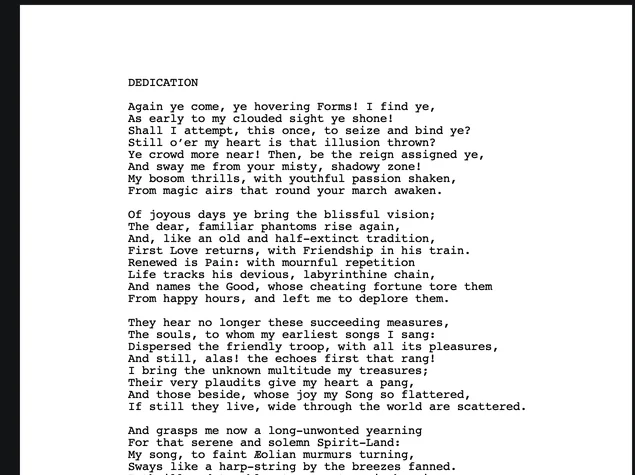
Faust as a screenplay, set in Courier with scene numbers in the margin. Beside it, the scene navigator with every scene heading, and below it the timeline with each scene as long as it is on the page.
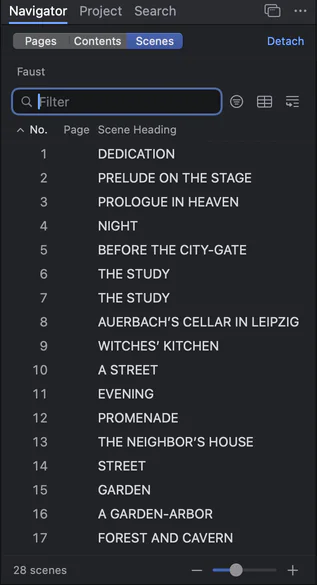
The scene navigator: numbered scenes of Faust with their headings

The timeline under the screenplay: Dedication, Prelude on the Stage and Prologue in Heaven as clips with their page lengths
Files that travel: Final Draft, Fountain, PDF.
Whatever you choose, make sure your script can leave the program as easily as it came in. In Goethe Write, the screenplay head has Import Screenplay… and Export.
- Final Draft (.fdx)Opens .fdx files with their element settings, page margins, title page, SmartType lists and revisions, and saves them back. Paragraphs you did not change go out exactly as they came in.
- FountainOpens and saves .fountain, including the title fields.
- PDF in and outImports a PDF with readable text and interprets it like Fountain. Exports PDF, and PDF with title page once the title page has text.
- ReportsExport ▸ Reports writes a Scene Report, a Scene List (CSV) and the Cast, also as CSV, for whoever plans the shoot.
The main Mac options, side by side.
Only facts the makers publish themselves, as we found them. Prices change; check before you buy. Each program has a page of its own in our comparisons, with more rows.
| Systems | Price model | Writing together | |
|---|---|---|---|
| Goethe Write | Mac (macOS 15 or later); free app for iPhone and iPad | US$79.99 once on the Mac, 14 days free; optional Goethe Cloud US$4.99 a month or US$49.99 a year | Same network or over the internet; only the person who invites pays, guests are free |
| Final Draft 13 | Mac and Windows; Final Draft Go for iPhone and iPad | One-time purchase or subscription | Real-time collaboration; every participant needs Final Draft 13 and a licence of their own |
| Fade In 5 | Mac, Windows and Linux; Fade In Access on the web, iOS and Android | US$79.95 for an individual licence with free updates; Fade In Access is an optional subscription | Online real-time collaboration (not in the demo) |
| Highland Pro | Mac, iPad and iPhone | US$9.99 a month or US$59.99 a year; 30-day trial | The maker does not describe real-time co-writing |
| WriterDuet | Browser; desktop app on paid plans; iOS and Android | Free plan (three projects); paid plans from US$9.99 a month | Real-time co-writing; paid subscribers can invite unlimited users, free or paid |
| Arc Studio | Mac, Windows, iPhone, iPad and browser | Free plan (two scripts); Essentials US$69 a year, Pro US$99 a year | Real-time co-writing; inviting needs a paid plan |
| Slugline 2 | Mac, iPhone and iPad | US$49.99 in-app purchase after six free pages; no subscription | Not described by the maker |
| Movie Magic Screenwriter 6 | Windows and Mac | One-time download; list price US$249.95 | iPartner: online collaboration with a writing partner |
Sources: Final Draft, Fade In, Highland Pro, WriterDuet, Arc Studio, Slugline, Movie Magic Screenwriter.
Checked on 13 November 2026 on the makers’ websites (Final Draft on 12 November 2026). All names are trademarks of their owners; Goethe Write is not affiliated with them.
Where other programs are ahead.
A fair guide says this plainly. Final Draft is the reference that the industry measures page counts against, and it runs on Windows as well. Fade In runs on Mac, Windows and Linux and already has locked pages. WriterDuet and Arc Studio work in the browser, so a team can write while nobody’s Mac is on. Celtx adds breakdowns, schedules and budgets, which Goethe Write does not do. Movie Magic Screenwriter is the official formatting software of the Writers Guild of America, East.
Goethe Write is Mac only, and it is available now on the Mac App Store. Locked pages and A pages for the production draft are planned, not built. On iPhone and iPad the page count is an estimate of about 55 lines per page; the Mac sets the exact pages. Shared projects live on the host’s Mac, which has to be on while others write.
Where Goethe Write is different: a one-time price on the Mac, a free iPhone and iPad app, novels, treatments and screenplays in one project, and collaboration in which only the person who invites pays.
All comparisons Goethe Write and Final Draft Goethe Write and Fade In Screenwriting software for students Writers’ room software
Price model: buy the app, rent only the service.
Goethe Write separates what you own from what costs money every month. You buy the Mac app once under Goethe Write ▸ Purchase and Subscription…; the subscription is only for the service between people.
Goethe Write for Mac
US$79.99once
For writing on your own Macs.
- 14 days free to try, once per Apple Account
- Every tool of the Mac app
- Your projects stay readable, printable and exportable, always
Goethe Cloud
US$4.99a month, or US$49.99 a year
For working with others.
- Writing together over the internet and in the same network
- Read links in any browser, with comments
- Goethe, the assistant, with your own AI key
 AI
- Guests you invite pay nothing
iPhone and iPad
Free
The companion app.
- Writes screenplays in Final Draft and Fountain format
- Opens your Mac projects
- Joins shared projects as a guest
Teams: US$29.99 per Mac seat, once, from five seats, through Apple Business Manager.
Planning in the same project as the script.
Many screenwriting programs stop at the page. Goethe Write keeps the work before it in the same project: collect beats under Tools ▾ ▸ Planning ▸ Beat Board and turn one into a scene with Create as Scene. Go ▸ Timeline (⌘5) sets every scene on tracks by storyline, character and place. Have a treatment or a novel? In the Screenplay phase, Create from Manuscript turns each of its scenes into a scene heading with its text as action, and the source stays beside the script.

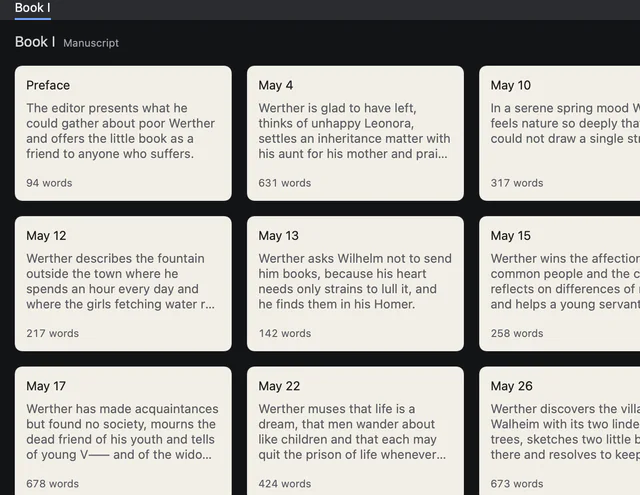
Index cards of the letters, each with title, synopsis and word count
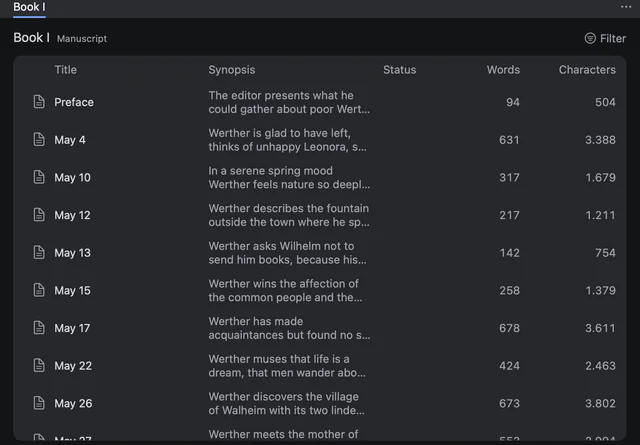
The outline table with synopsis, status and word count per letter
What happens to your scripts if you stop paying.
Ask this of every program before you buy. In Goethe Write the 14-day trial ends without a charge; if you don’t buy, writing and creating projects pause, and everything stays readable, searchable, printable and exportable. If you cancel Goethe Cloud, working together, new read-link states and the assistant pause; your projects stay on your Mac, and with the one-time purchase you keep writing.
Projects are files on your disk, in iCloud Drive or in any folder you choose, in an open, documented format. Screenplays leave as .fdx, Fountain or PDF whenever you like.
Questions about choosing screenwriting software for Mac.
What is the best screenwriting software for Mac?
The one that matches how you work. If you exchange .fdx files with a production every day, page-exact Final Draft compatibility matters most. If you write with partners, look at who has to pay for collaboration. If you write alone and dislike subscriptions, a one-time price matters. Use the seven questions above and judge for yourself.
Is Goethe Write available now?
Yes. Goethe Write is available now on the Mac App Store, and the iPhone and iPad app is free in the App Store.
Can Goethe Write open my Final Draft scripts?
Yes. It opens .fdx files with their formatting and element settings and saves them back as .fdx. Paragraphs you did not change leave the file exactly as they came in.
Is Goethe Write a subscription?
No. On the Mac you buy it once for US$79.99, after 14 free days. Goethe Cloud is an optional subscription for working together, read links and the assistant, at US$4.99 a month or US$49.99 a year.
Does Goethe Write run on Windows?
No. Goethe Write is made for the Mac, with a free app for iPhone and iPad. Writers on Windows can read your work through a read link in any browser.
Can I write a novel and a screenplay in the same program?
Yes. A Goethe Write project can hold a manuscript and several screenplay drafts, and Create from Manuscript turns the scenes of a novel or treatment into a screenplay draft.
Judge it on your own script.
The best test is your own .fdx or Fountain file. Try Goethe Write free for 14 days on the Mac, then buy it once for US$79.99 – or keep reading the comparisons first.